46 Labs will be proactively reaching out to all Communication Service Providers individually for scheduling the September 2026 Upgrade.
Table of Contents
- September 2026
- Auth0 Authentication
- Secure Personal API Tokens
- SOMOS DNO
- Inline Documentation
- Enhancements
- One-time passcode protection for the API documentation
- Service provider ID in the STIR/SHAKEN attestation report
- Service provider ID taken from the signing certificate
- Connection fee in the international and LATA/OCN destination reports
- IP lookup on relationship media report rows
- Automatic retry of card payment processing fees
- Nightly cleanup for the pending international rate data
- Bug Fixes
- Scheduled reports did not run on some installations
- Routing simulation returned a server error when no routing service could be reached
- Sample file downloads failed on the upload screens
- Portal IP restriction could not be switched off
- Sign-in error screen retried indefinitely
- CDR uploader log could fill the disk
- Long-running rating batches could fail on an idle connection
- Provisioning sync aborted on unexpected data
- Invalid STIR/SHAKEN service provider filter entries broke synchronization
- Blocked routes were not enforced on fallback vendors
- Rate decks with no connection fee value returned no route
- Call-ID prefix could collide with a call identifier
- Delayed call teardown could be retransmitted or lose its CDR
- Undeployed media addresses were offered for call routing
- Live trace dropped packets and altered packet length
- August 2026
- March 2026
September 2026
Auth0 Authentication
Background
The PeerEdge Orchestrator has transitioned from locally managed usernames and passwords to Auth0 Universal Login. The Subscriber, Agent, and Relationship portals now authenticate users through their configured Auth0 organizations.
This centralizes authentication in Auth0 while allowing PeerEdge Orchestrator to continue enforcing portal permissions, relationship access, and other application-level authorization controls.
Platform Updates
The PeerEdge Orchestrator now use the Auth0 v2 client library. User sessions are renewed using refresh tokens stored in browser memory instead of hidden browser frames. This approach provides more reliable session renewal in browsers that block third-party cookies or restrict cross-site tracking.
The PeerEdge API now:
- Validates Auth0-issued access tokens before allowing access to protected resources.
- Prevents an access token associated with a signed-out session from being reused for the remainder of the token’s original lifetime.
- No longer performs local password authentication through the legacy direct-login and portal-login API operations.
- Directs password reset and password change requests through Auth0 instead of processing them through PeerEdge.
- Supports Relationship Portal users associated with multiple carriers by loading the first available relationship when no relationship has been explicitly selected.
- Continues to honor the selected relationship whenever the portal includes a relationship identifier in the request.
Benefits of Auth0
The transition to Auth0 provides several security and usability benefits:
- Centralized identity management: Authentication policies and user identities can be managed consistently through Auth0.
- Reduced password-handling risk: PeerEdge no longer needs to directly authenticate or manage users’ local passwords.
- Improved browser compatibility: Refresh-token-based session renewal avoids dependence on hidden frames and third-party cookies.
- Standards-based authentication: Auth0 uses established OAuth 2.0 and OpenID Connect protocols for issuing and validating tokens.
- Organization-based access: Auth0 organizations provide a structured way to associate users with the appropriate PeerEdge portal environment.
- Improved sign-out protection: Access tokens from signed-out sessions are prevented from being reused, even if they have not yet reached their normal expiration time.
- Extensible security controls: Auth0 can support capabilities such as multifactor authentication, enterprise identity-provider integration, password policies, and anomaly detection when those features are configured.
- Consistent account recovery: Password resets and password changes are handled through a common Auth0-hosted workflow rather than separate portal-specific processes.
This update modernizes PeerEdge authentication, improves session reliability, and separates identity verification from application-level authorization and carrier access.
The Migration to Auth0
How signing in to the PeerEdge Orchestrator works now that authentication has moved to Auth0, and what it means
for the accounts you manage.
Sign-in for PeerEdge has moved to Auth0, a dedicated identity service.
- Every existing user account is migrated to Auth0. Nothing is left behind, and no one had to
create a new account. - Existing password hashes are carried over. Users sign in with the same password they had before.
- The PeerEdge Orchestrator is no longer the source of authentication. It does not store, check,
or reset passwords. Auth0 verifies who someone is; PeerEdge decides what they may do. - Password reset is now performed by Auth0, not by PeerEdge.
Your data, your relationships, your reports, and every user's permissions are unchanged. Only the way a
sign-in is authenticated and verified has changed.
What is changing and what is not.
1. Auth0 confirms who they are — via a an Auth0 managed email-password credential, a Microsoft account, a Google account, or a custom enterprise connection (e.g. Okta or another 3rd party IDP). For custom enterprise connections open a support ticket with 46 Labs.
2. PeerEdge confirms they are allowed in — a matching, active user record exists in PeerEdge.
PeerEdge matches the two by email address. If a person authenticates successfully at Auth0 but
has no active PeerEdge user record with that exact email address, they are refused access and see the error message "User does not exist in system."
This is why you still control access from the PeerEdge portal. Deactivating or removing a user in
PeerEdge blocks them, regardless of what Auth0 still knows about them. Adding a user in PeerEdge is
still how someone gets access. Nothing about user administration moved out of your control.
Sign-in methods
The sign-in page offers three ways to sign in. Which of these your organization, your relationship customers or agents use is up to your own policy and that of your customers — all three lead to the same PeerEdge account, as long as the email address matches an active PeerEdge user.
Email and password
To view a short video on how to set up multi-factor authentication using one-time passwords for the email and password authentication method for Subscriber Portal users, please click here.
To view a short video on how to set up multi-factor authentication using one-time passwords for the email and password authentication method for Relationship (carrier) Portal users, please click here.
46 Labs recommends sharing this video with your relationship portal and agent customers prior to the Auth0 migration so they're not surprised by the one time setup requirement of the one-time password MFA. The only difference between the relationship portal and the agent portal login process is the Portal URL and the landing page once they've successfully authenticated.
The traditional email-password method: the user's email address and a password hash held by Auth0.
This is the method that existing PeerEdge users are migrated onto, and the one that carried over their previous password hash. It is also the only method that involves a password PeerEdge or Auth0 can reset.
> Newly created accounts in the PeerEdge Portal will still send a welcome email containing a link to set their Auth0 password. If the Microsoft or Google authentication method is used then this welcome email can be ignored.
Continue with Microsoft
To view a short video on the first time use of the Microsoft authentication method for Relationship (Carrier) Portal users, please click here.
Signs the user in using their existing Microsoft work or personal account. The password is never entered on the PeerEdge or Auth0 sign-in page — Microsoft verifies the users credentials and confirms the result.
There is no PeerEdge password for these users, and nothing for PeerEdge or Auth0 to reset. Password problems are handled by whoever administers their Microsoft account.
Continue with Google
The same arrangement using a Google account. Google verifies the sign-in and confirms the result; there is no PeerEdge password involved, and password issues are handled on the Google side.
Users can use more than one
The same person can sign in by an Auth0 managed email and password on one day and with Microsoft the next. Each method is a separate credential, but because PeerEdge matches on email address, all of them lead to the same PeerEdge user and the same permissions.
Important: because the email address is what links a sign-in to a PeerEdge account, changing a user's email address in PeerEdge will stop their existing sign-in from working. Treat an email change as re-provisioning the user (i.e. send them a new welcome email).
Multi-factor authentication
Users signing in with Auth0 managed email and password are required to confirm their identity with a one-time code from an authenticator app. This is in addition to their password, and it applies to every email-and-password user.
Enrollment happens the first time they sign in. Auth0 presents a setup screen, the user scans the code with an authenticator application on their phone, and confirms with a generated code. From then on, each sign-in asks for a current code from that app.
A user who loses or replaces the enrolled device cannot re-enroll themselves — their existing enrollment must be cleared before they can set up a new one. Raise this with 46labs support.
Users signing in with Microsoft or Google are covered by whatever additional verification methods those providers require; that policy is set by the administrator of those accounts, not by PeerEdge or Auth0.
Password reset for Auth0 managed accounts
Password reset is now performed by Auth0. The PeerEdge Orchestrator no longer resets passwords and no longer holds anything that can be reset. The old in-portal "change this user's password" function has been retired.
There are two ways to get a user a working password, and both end at Auth0.
The user resets it themselves. The PeerEdge Orchestrator sign-in page carries a Reset password link. The user enters their email address and Auth0 emails them a link to set a new password. This is the normal route and requires nothing from you.
You send them a fresh link from the portal. Use Resend welcome email on the user's record. This asks Auth0 for a new set-password link and emails it to the user. Use it when someone never received the original welcome email, when the link has expired, or when a user reports that self-service reset is not reaching them.
Two things to know about it:
- The link is time-limited. If a user waits too long, send another.
- The user's existing password keeps working until they actually submit a new one, so sending a link is not disruptive — a user who does not need it can ignore it.
Password reset does not apply to Microsoft or Google users. There is no PeerEdge-side password to reset. If a Microsoft or Google user receives a welcome email containing a set-password link, they can disregard it and sign in with their provider button instead.
What to do about common situations
Anything that requires a change inside Auth0 itself — clearing an authenticator enrollment, investigating why an email was not delivered, restoring a deleted sign-in account — needs 46labs. Portal administrators do not have direct access to Auth0, by design.
Frequently asked questions
Do our migrated users need to choose new passwords?
No. Existing passwords hashs are carried across during the migration. Users sign in with exactly the password they had before.
The sign-in page looks different now. Is it genuine?
Yes. The Sign-in page is now hosted by Auth0, so the page is a different design from the old PeerEdge login screen. You should see 46 Labs branding, a welcome message naming your PeerEdge instance, buttons for Microsoft and Google, and fields for entering the Auth0 managed email address and password.
Why are we being asked to set up an authenticator app?
Because a one-time code is required as an additional authentication factor for everyone who signs in with email and password. It is a one-time setup per user, done at their first sign-in after the change, and it protects the account if a password is ever guessed or stolen.
A user lost the phone with their authenticator app. What now?
They cannot re-enroll on their own. Contact 46labs support to have the existing enrollment cleared, after which the user can set up a new device at their next sign-in.
Where do users go to reset a password?
The Reset password link on the sign-in page. As an administrator you can also send a fresh set-password link with Resend welcome email on the user's record.
A user clicked Reset password and no email arrived. Why?
The most common reason is that the person signs in with Microsoft or Google, so there is no password to reset. The other possibility is that their email-and-password credential no longer exists. Try Resend welcome email first; if that does not resolve it, contact 46labs.
Can we still add and remove users ourselves?
Yes, exactly as before, in the PeerEdge portal. That has not changed and is still the control that decides who has access.
We deactivated a user. Can they still sign in?
They may still be able to authenticate on the Auth0 sign-in page, because their credential still exists there — but they cannot get into PeerEdge. They will be refused with "User does not exist in system." Deactivating in PeerEdge is effective immediately for access purposes. If you want their credential removed from Auth0 as well, ask 46labs.
Does the old PeerEdge password still work for anything?
No. PeerEdge no longer checks passwords at all. Every sign-in goes through Auth0.
Can one person use both a password and their Microsoft account?
Yes. They lead to the same PeerEdge user and the same permissions, because PeerEdge matches on email address.
How do we set up Microsoft or Google sign-in for our users?
What happens if Auth0 is unavailable?
New sign-ins would not be possible for the duration. Users already signed in continue working until their session expires. Auth0 automatically refreshes session tokens every 30 minutes. Call processing is never affected if Auth0 is unavailable.
Do your Personal API tokens (PATs) still work if Auth0 is unavailable?
Yes. PeerEdge Personal API tokens are separate from the Peeredge Portal access and are not affected. Note: that creating a new PAT requires a code emailed to the PeerEdge administrator making the request, and t deactivating a PeerEdge administrator account also disables their PATs along with their portal access.
Is any of our data changed by the migration?
No. The migration only changed how a sign-in is verified. relationships, rates, routing, reports, invoices, permissions, and user records are untouched.
Who do we contact with a sign-in problem we cannot resolve?
46 Labs (support.46labs.com). Useful details to include: the user's email address, which portal they are trying to reach, which sign-in method they used, the exact message shown on screen, and the approximate time of the attempt.
Expected Operator (PeerEdge user) Experience
Operators are directed through the Auth0 Universal Login experience when signing in. Session renewal occurs without storing the Auth0 refresh token in browser local storage.
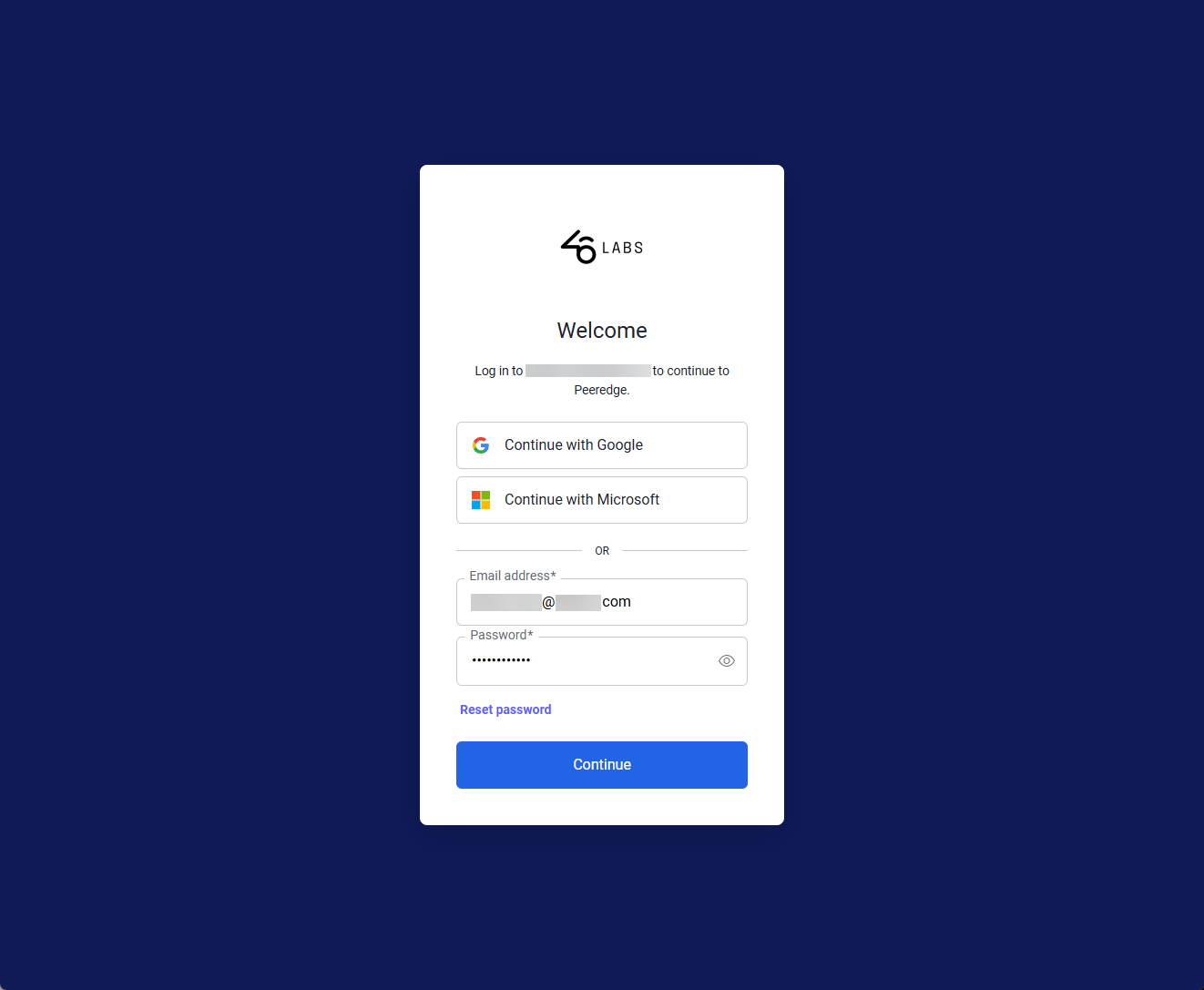
When an unauthenticated user attempts to login to the PeerEdge Orchestrator, the user will be presented with the Auth0 enabled login page (auth.peeredge.com). If authenticating with a Google or Microsoft account, click on the appropriate button, otherwise enter your email address and password and click the Continue button.
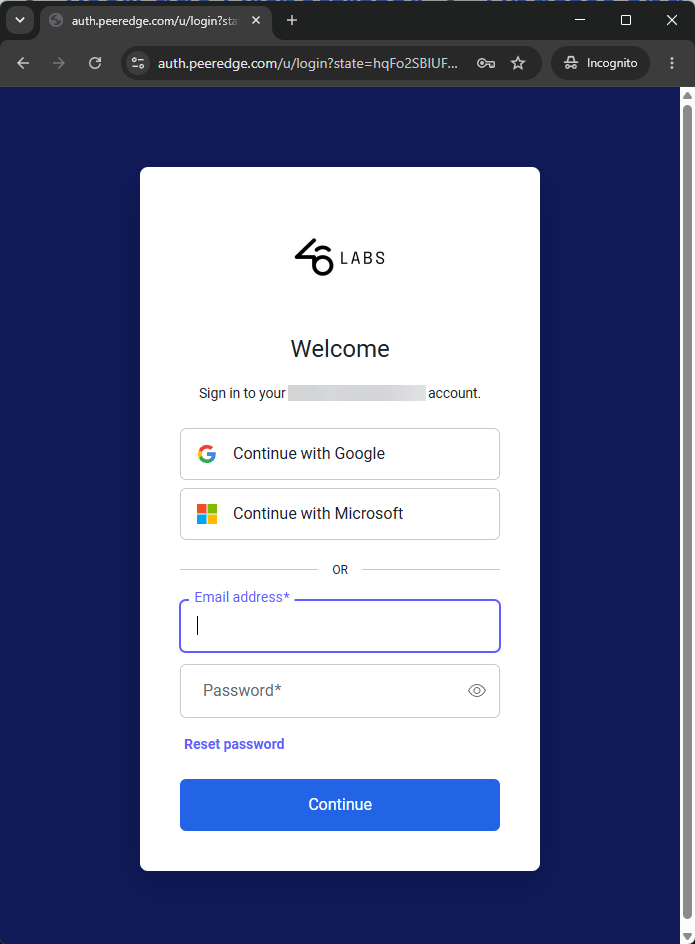
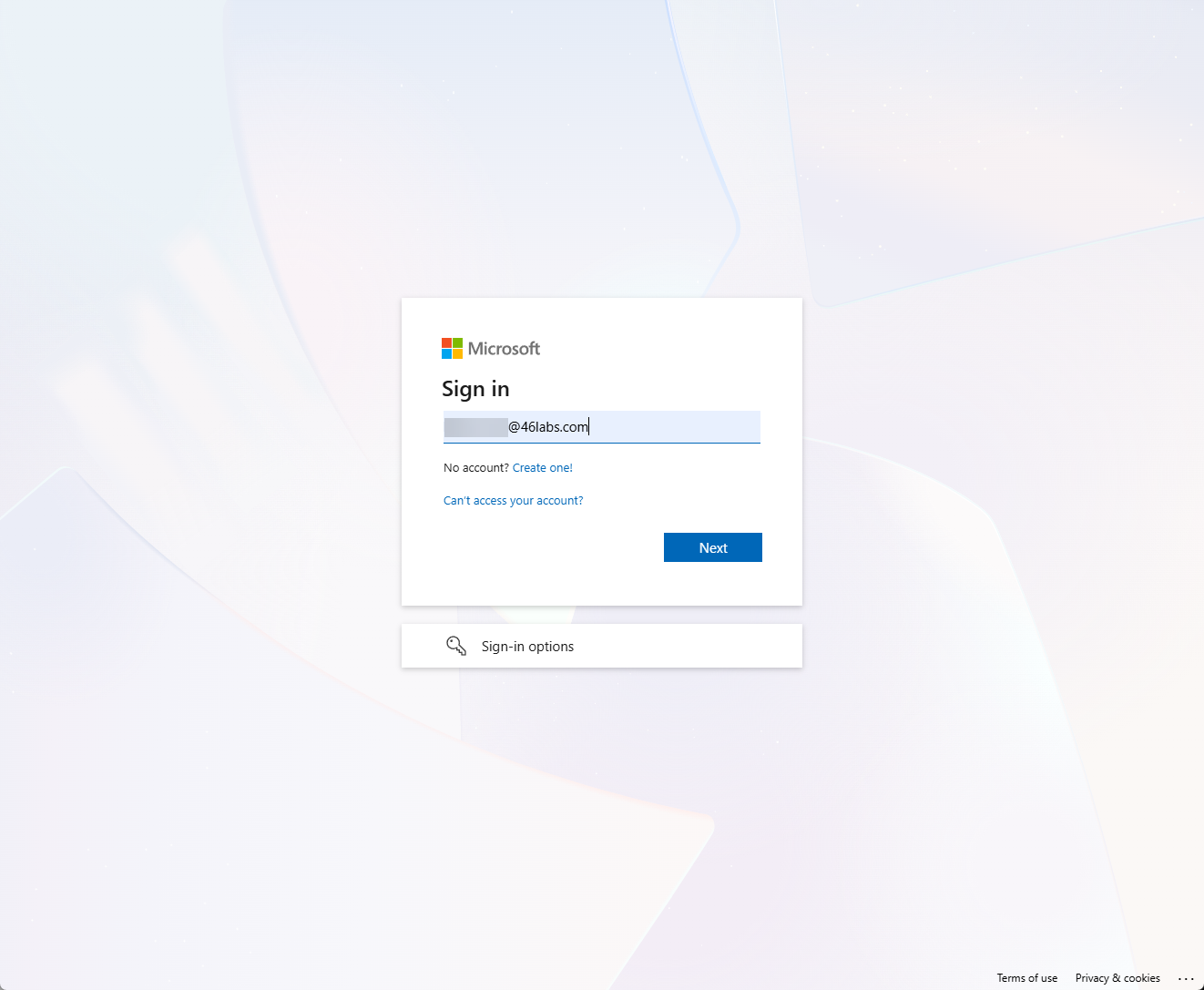
The screenshots below illustrate the Continue with Microsoft sign-in process.
Step 1. Enter your Microsoft Entra ID in the Sign in box and click Next
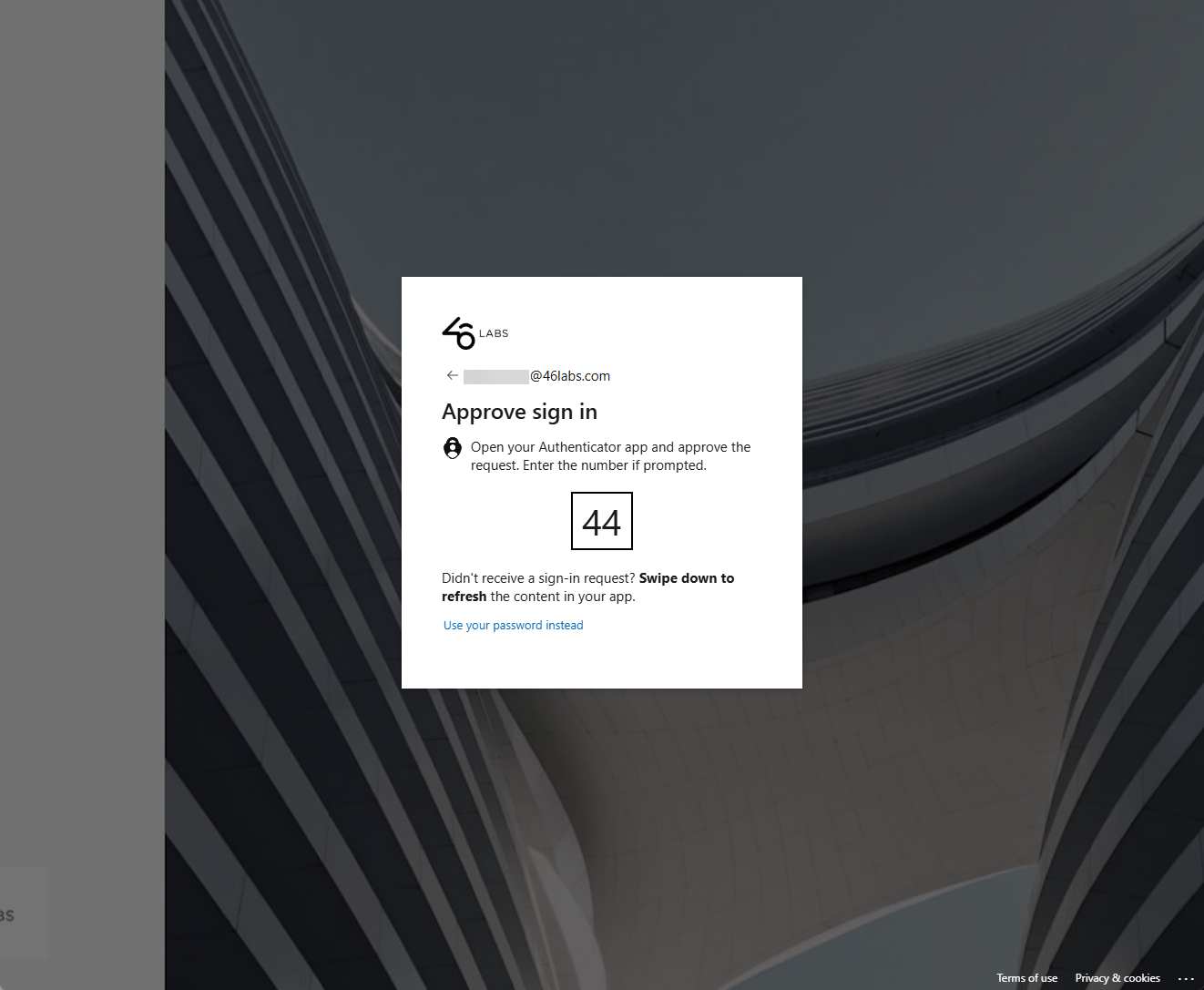
Step 2. If presented with the Approve sign in prompt then enter the code provided in the Microsoft Authenticator app to login.
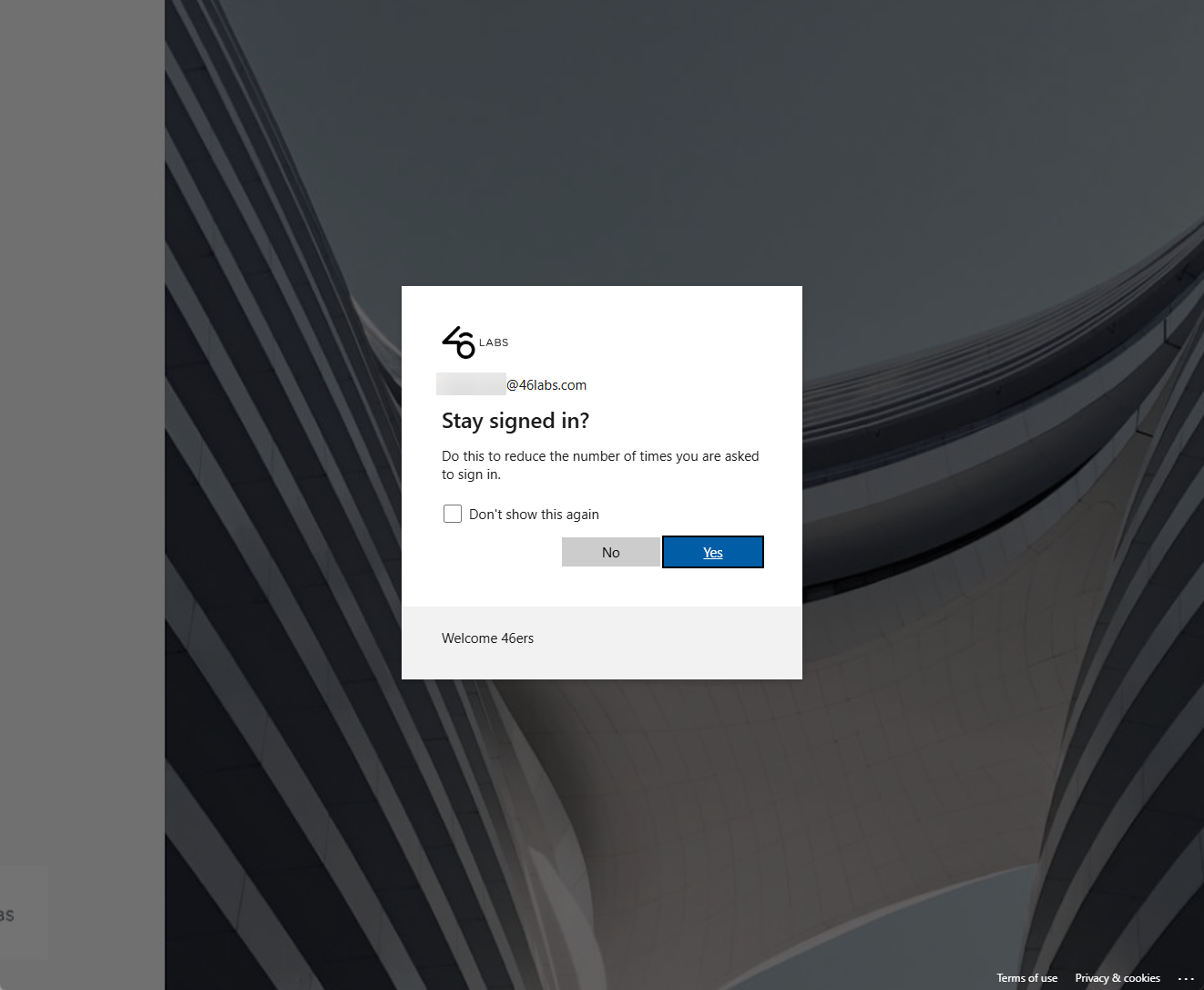
Step 3. If the Stay signed in? dialog box is presented. Click Yes or No as appropriate.
The below screenshots explain the username (email address) and password login process.
Step 1. Enter your PeerEdge Orchestrator username (email address) and password and click the Continue button.
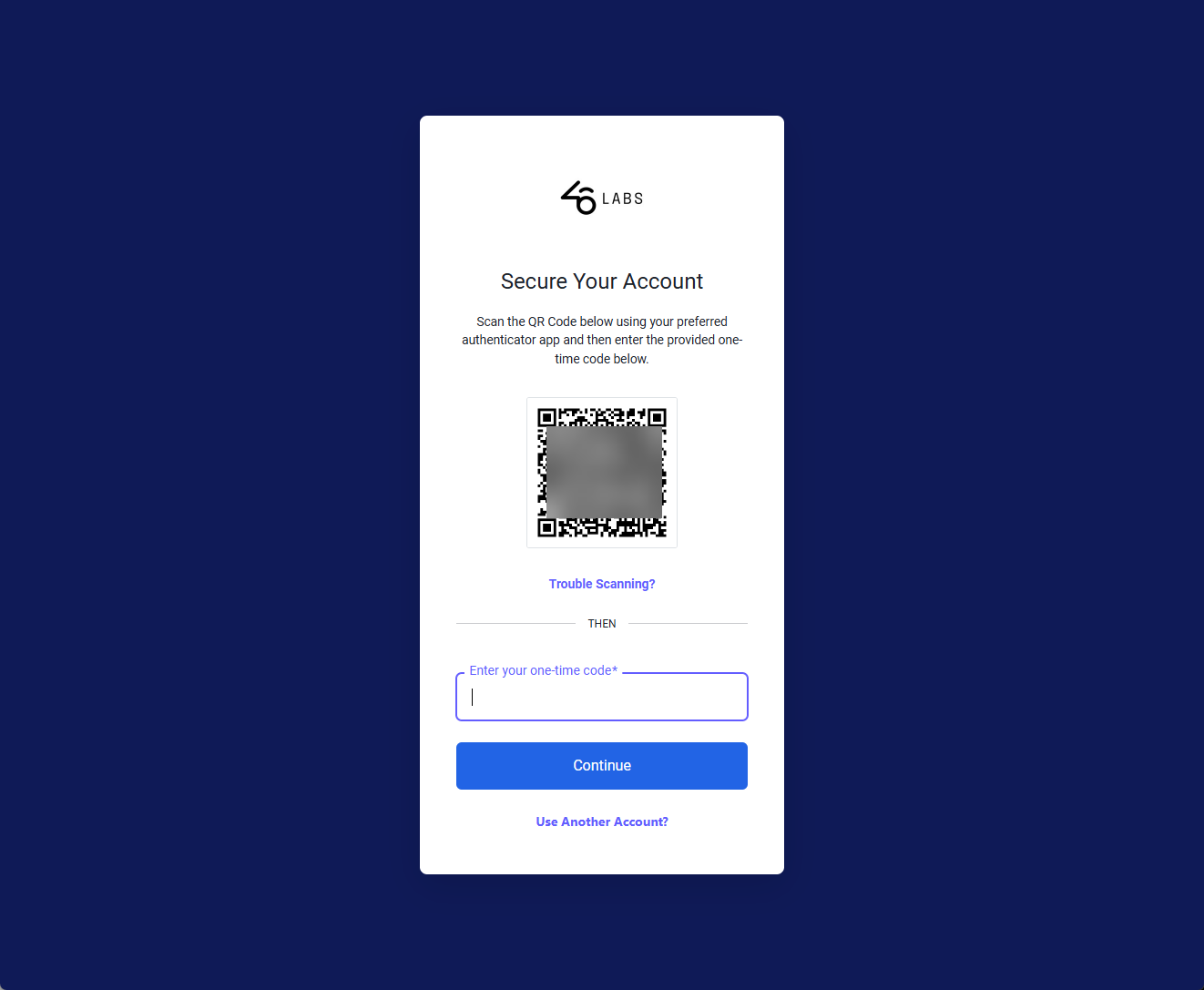
Step 2 (first time login). If you have not associated your Auth0 managed email - password account with an authenticator app (e.g. Microsoft, Google, Guardian, Okta, etc.) you will be presented with the following screen. Open your preferred authenticator app and use the app's scan code feature to add the account to the authenticator app.
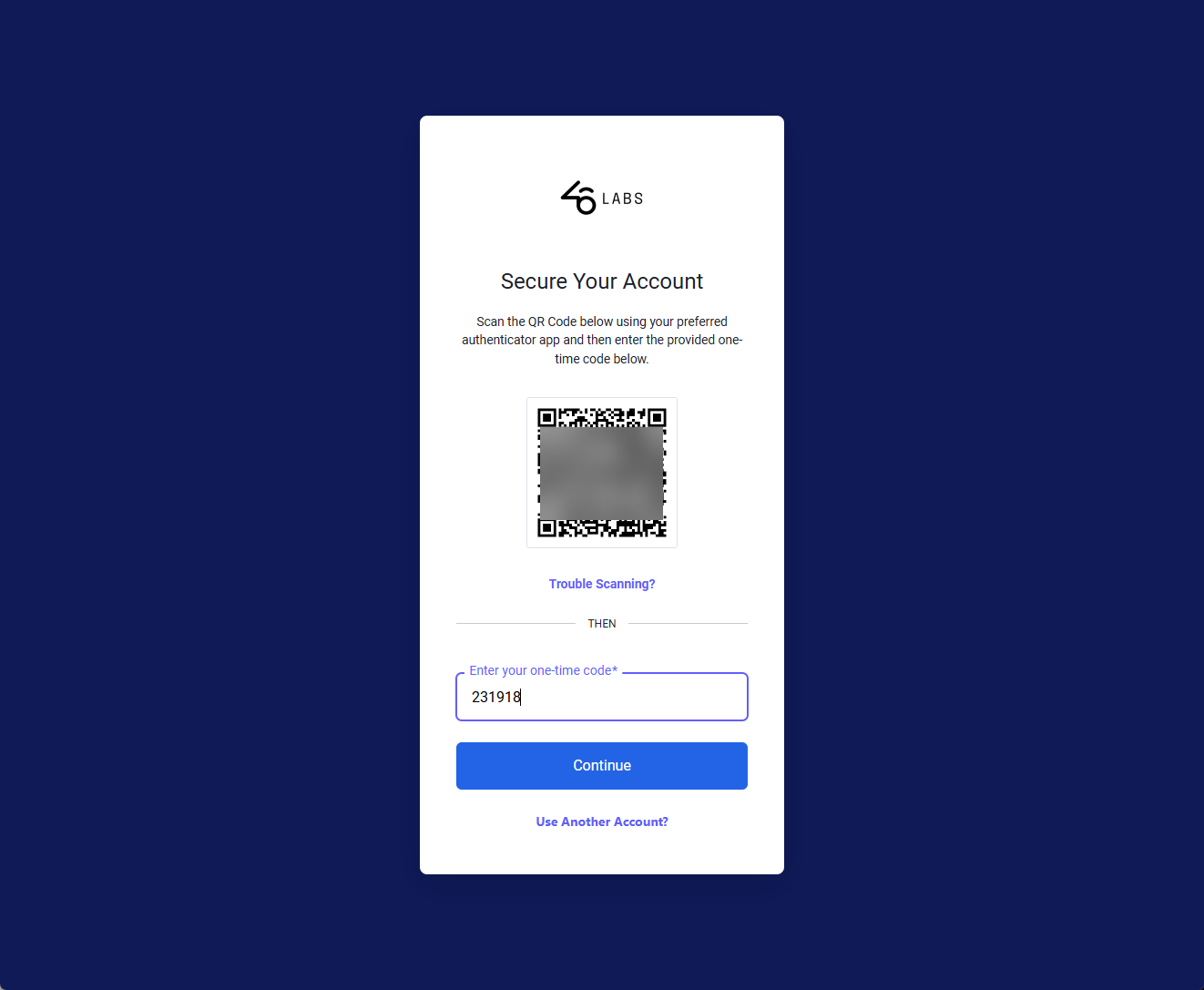
Then enter the displayed code to login.
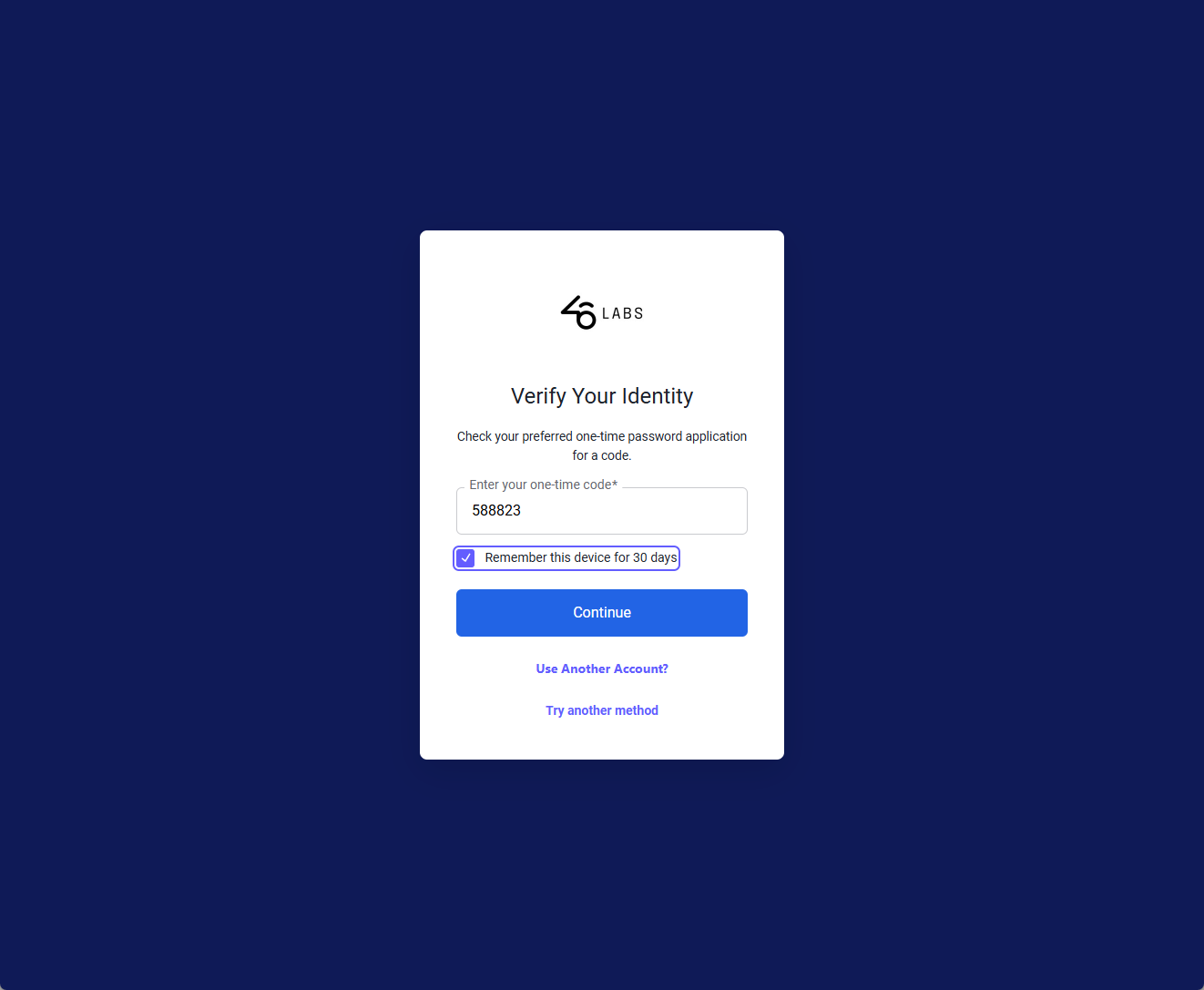
Step 2 If you have already associated your Auth0 managed email-password account with your preferred authenticator app then the below screen will appear. Provide the code from the authenticator app and click the Continue button to login to the PeerEdge Orchestrator. Optionally you can check the "Remember this device for 30 days" to potentially reduce the number of times you need to login.
WARNING: By design, the implementation of Auth0 prevents the use an Operator's (PeerEdge Admin user's) JSON Web Token (JWT) for use in API scripts or automation. Any existing API scripts using an Operator's JWT will NOT work after this upgrade. These API scripts will need to be updated to use a Secure Personal API Token (PAT) for authentication.
Secure Personal API Tokens
API Token Background
Personal API tokens allow an authorized PeerEdge Orchestrator administrator to call supported APIs from scripts, automation, or continuous integration systems. Because a token has the same access of the user who created it, token creation and storage require additional safeguards.
API Token Platform Update
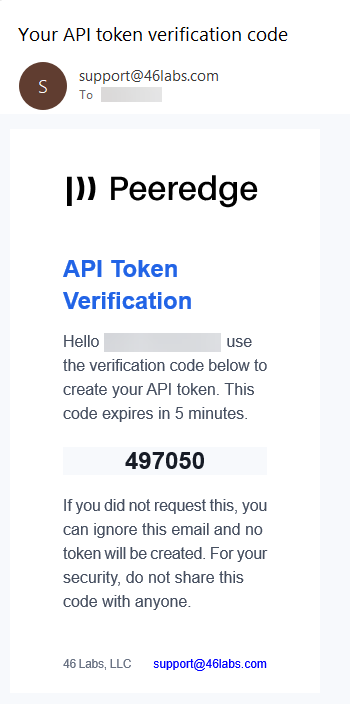
Personal API token creation is protected by an six-digit verification code emailed to the PeerEdge Orchestrator administrator. The verification code expires after five minutes and is invalidated after five incorrect attempts.
The feature includes the following controls:
- API Tokens must be enabled for the service provider's account.
- Token management is restricted to the PeerEdge administrator role.
- Token creation and verification-code requests are rate limited.
- Token creation and revocation are recorded in the General Logs audit history.
- The account's main user is notified when a token is created.
- Expiration notifications are sent before a token expires.
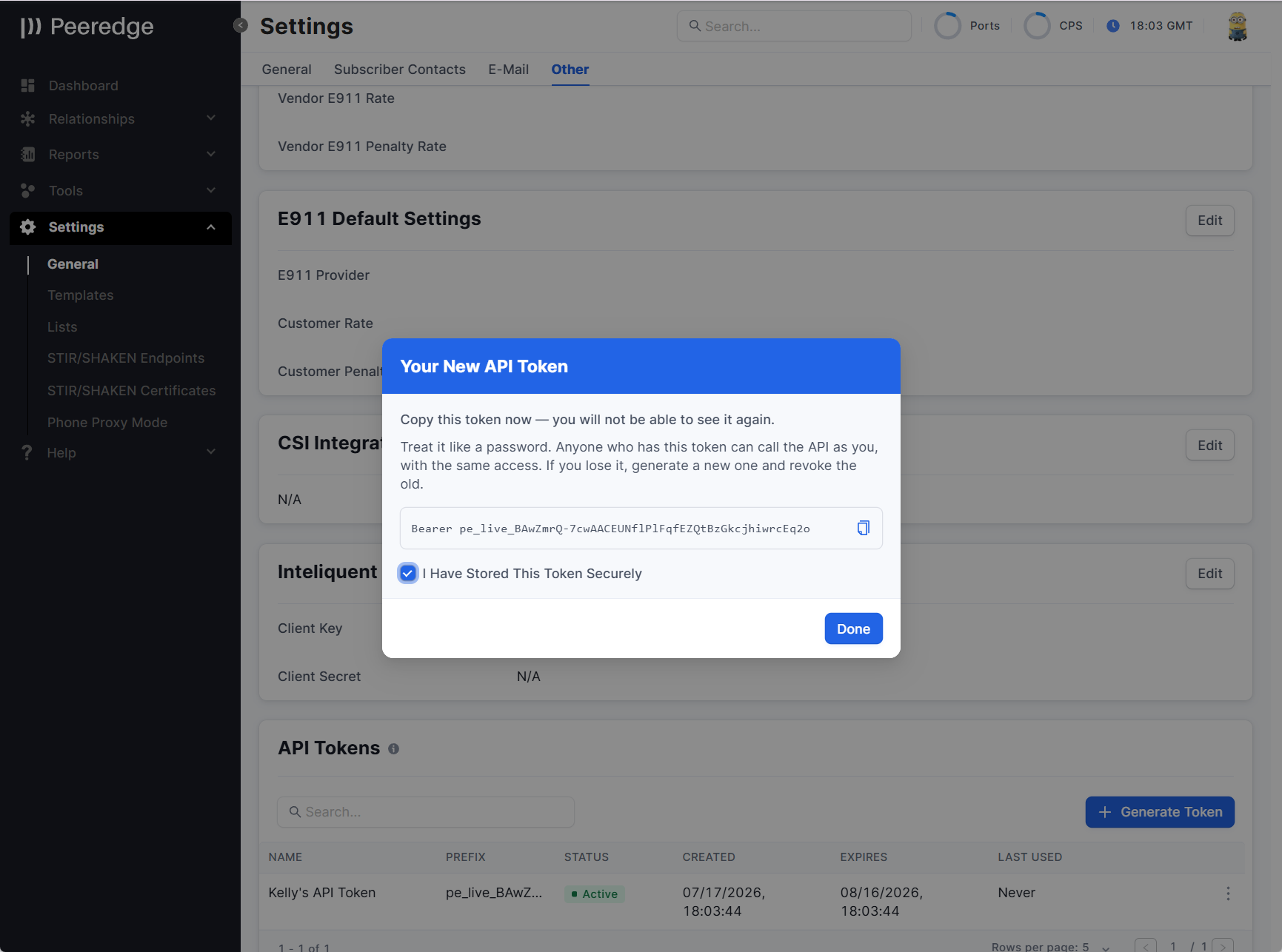
- The complete token is displayed once. PeerEdge stores a cryptographic digest instead of the complete token.
- Available expiration periods are 1, 7, 30, or 90 days.
- 46 Labs employees cannot create a token while impersonating another PeerEdge user.
Using Personal API Tokens
Personal API tokens replace the Operator JWT for all script, automation, and continuous integration access.
Once the PeerEdge platform is upgraded to Auth0 authentication, any existing script that authenticates with an Operator's JWT will stop working and must use a Personal API Token (PAT) instead.
The Authorization header format does not change. Only the source of the token changes:
• Before: the script called /api/v2/login with a username and password to obtain a short-lived JWT before each run.
• After: you generate a PAT (see below), the login step is removed entirely — no username or password needs to be embedded in the script to fetch a fresh token.
• Because PeerEdge stores only a cryptographic digest and displays the complete token once, treat a PAT the same as an API key: keep it in an environment variable or a secrets manager, never hardcoded in script.
• Every API call from a NOC or any other integration should also send a User-Agent header. This keeps the traffic from tripping the WAF when the source IP changes, and it lets 46 Labs identify the caller in logs.
Example: curl
Before (Operator JWT — stops working after the upgrade):
curl -X GET "https://api-customername.peeredge.com/api/v2/trunk_groups" \
-H "Authorization: Bearer <Operator_JWT_from_login>" \
-H "Content-Type: application/json"
After (Personal API Token — same request; the token source is the only difference):
curl -X GET "https://api-customername.peeredge.com/api/v2/trunk_groups" \
-H "Authorization: Bearer <Your_Personal_API_Token>" \
-H "Content-Type: application/json" \
-H "User-Agent: CompanyName-Integration/1.0"
Creating a trunk group with a PAT:
curl -X POST "https://api-customername.peeredge.com/api/v2/trunk_groups" \
-H "Authorization: Bearer <Your_Personal_API_Token>" \
-H "Content-Type: application/json" \
-H "User-Agent: CompanyName-Integration/1.0" \
-d '{
"name": "New Trunk Group",
"status": "active"
}'
Example: Python
import os
import requests
PAT = os.environ["PEEREDGE_PAT"] # store the token as an env var, not in code
headers = {
"Authorization": f"Bearer {PAT}",
"Content-Type": "application/json",
"User-Agent": "CompanyName-Integration/1.0",
}
response = requests.get(
"https://api-customername.peeredge.com/api/v2/trunk_groups",
headers=headers,
)
print(response.status_code)
print(response.json())
Example: Node.js (Axios)
const axios = require("axios");
const PAT = process.env.PEEREDGE_PAT; // store your token as an environment variable
axios
.get("https://api-customername.peeredge.com/api/v2/trunk_groups", {
headers: {
Authorization: `Bearer ${PAT}`,
"Content-Type": "application/json",
"User-Agent": "CompanyName-Integration/1.0",
},
})
.then((res) => console.log(res.status, res.data))
.catch((err) => console.error(err.response?.status, err.response?.data));
To Generate an Personal API Token
- Open API Tokens:
- In the subscriber portal, go to Settings > General > Other (The example shown below).
- In the agent portal, select API Tokens from the navigation menu.
- In the relationship portal, open Settings > API Tokens.
- Select Generate Token.
- Enter a token name and select an expiration period.
- Select Send Verification Code.
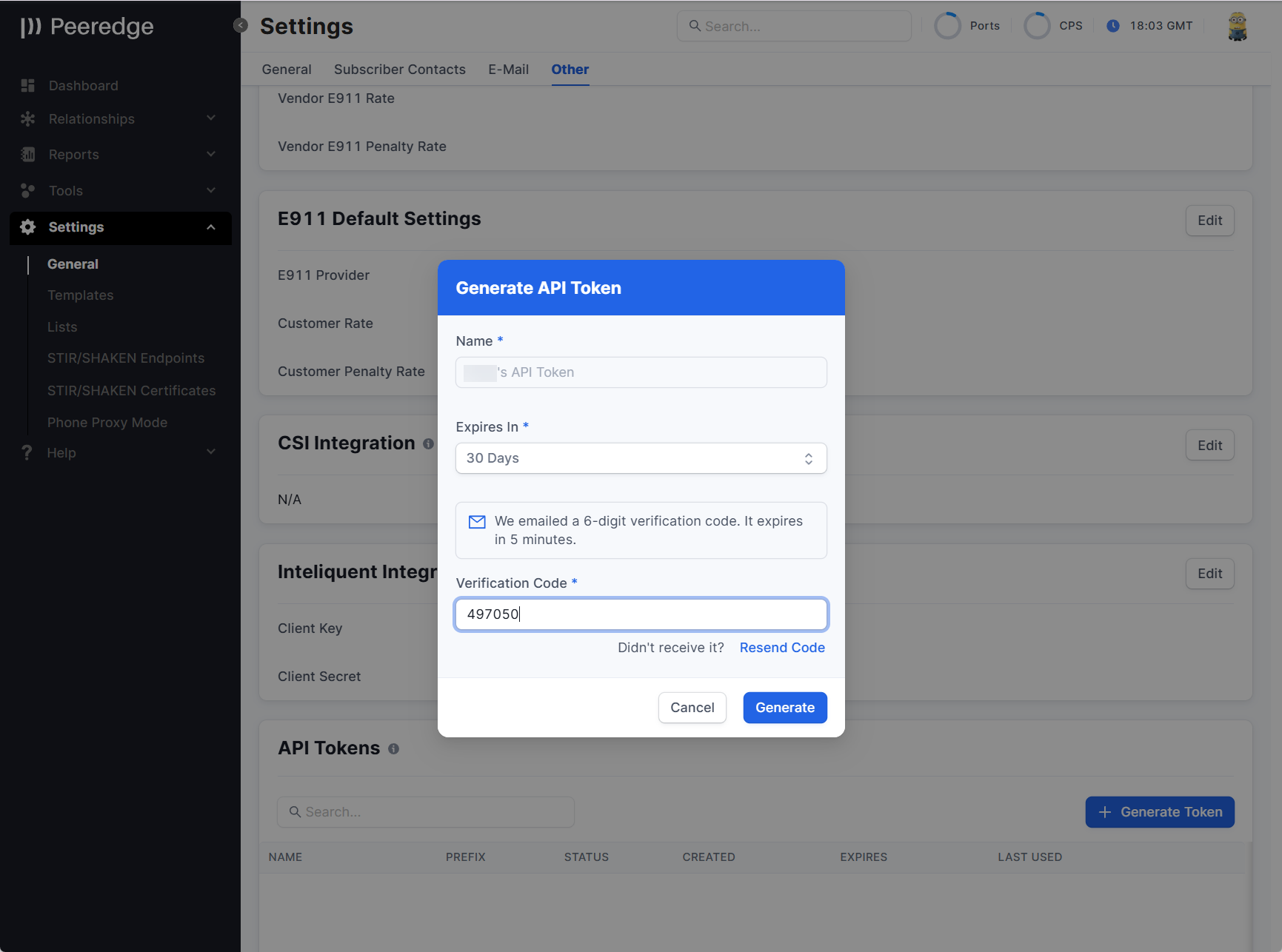
- Enter the six-digit code sent to the email address associated with the current operator.
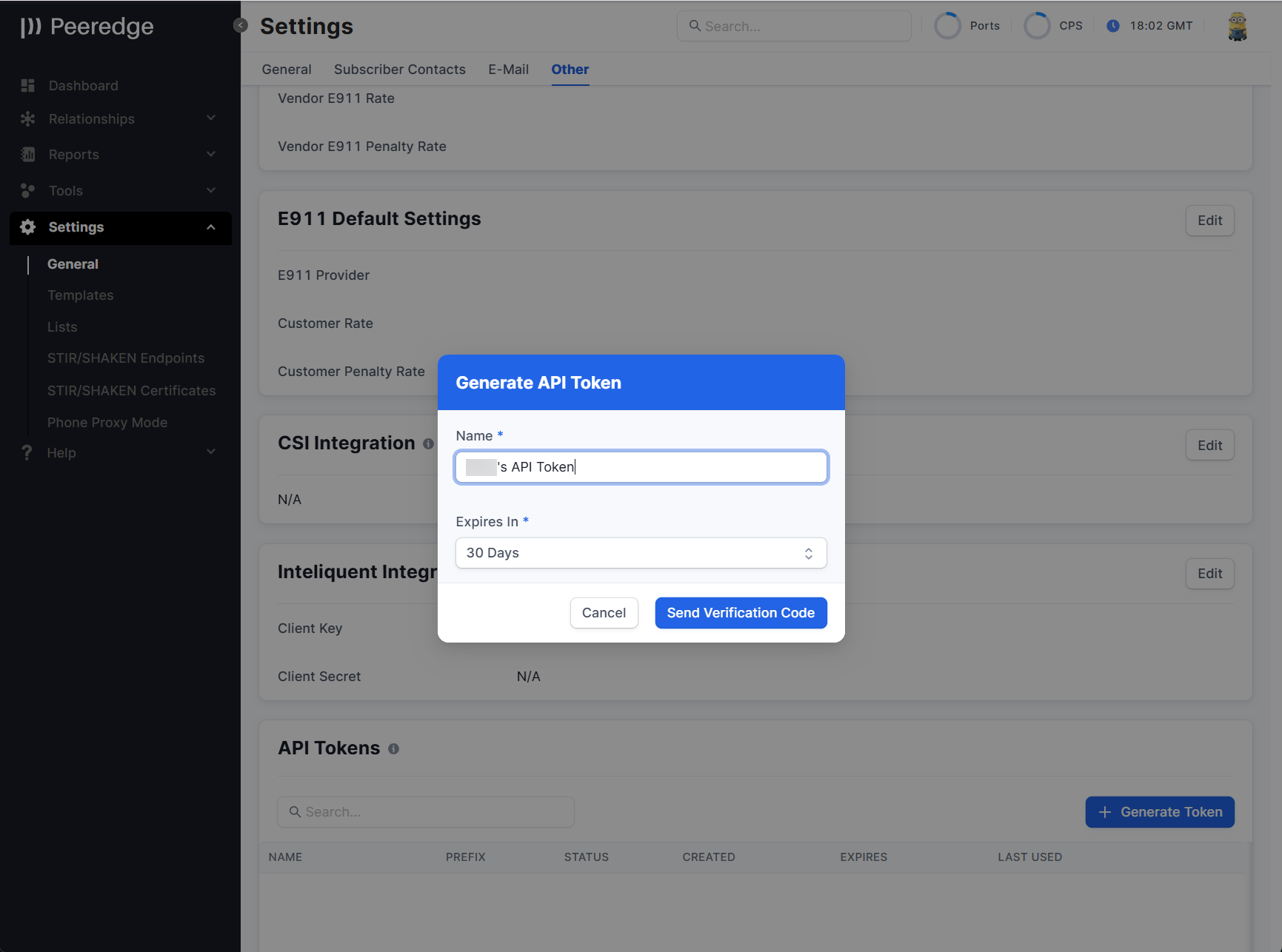
- Select Generate.
- Copy the token when it is displayed. The complete token cannot be displayed again. Check the I Have Stored This Token Securely checkbox and then click the Done button.
To Revoke an API Token
- Open API Tokens.
- Locate the token.
- Select the revoke action.
- Confirm the request.
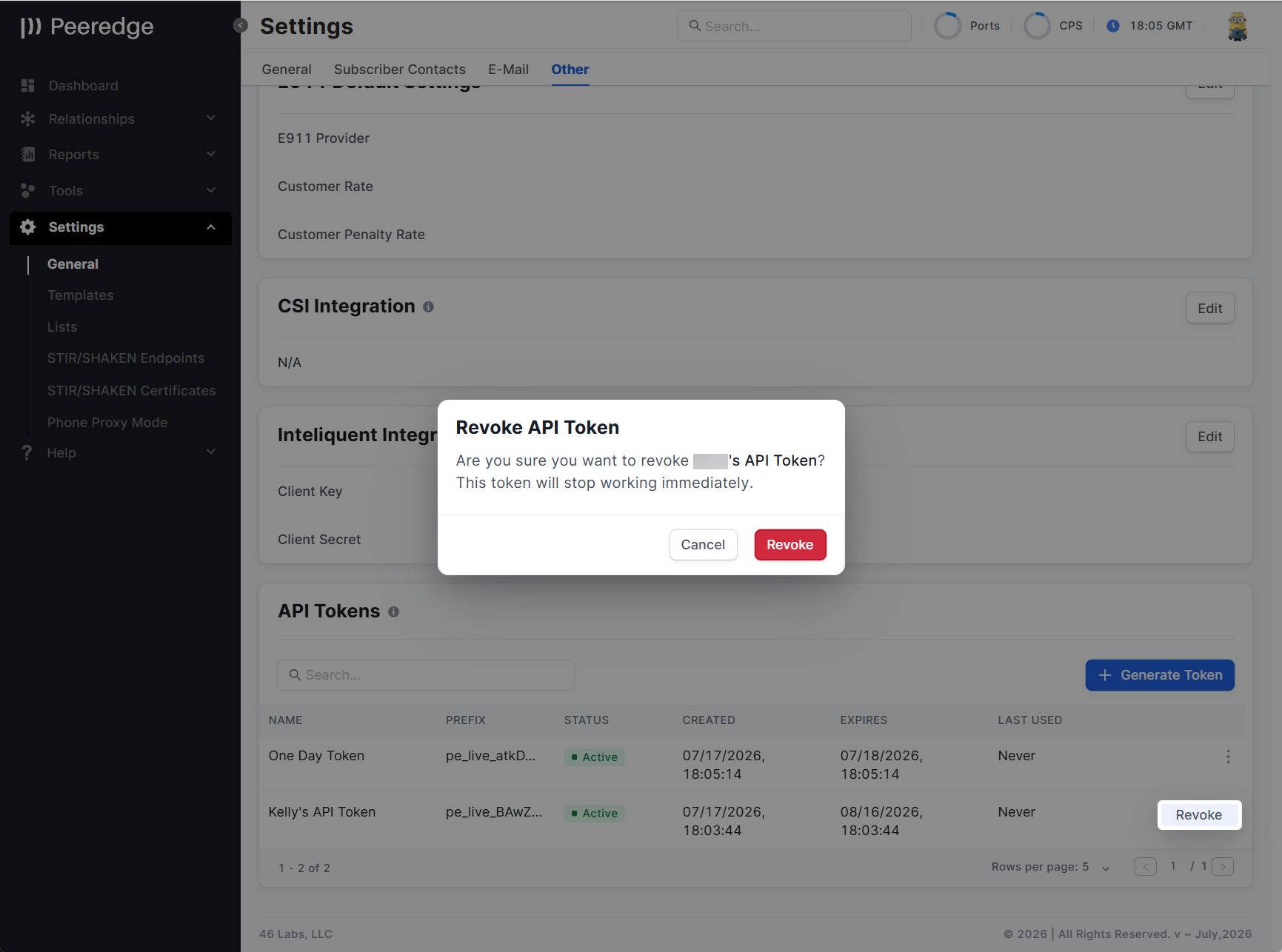
The token stops working immediately after it is revoked.
SOMOS DNO
New PeerEdge customers have access to SOMOS DNO as the default DNO database for use in routing decisions. Current PeerEdge platform customers can reach out to their account manager to inquire about enabling SOMOS DNO on their existing PeerEdge deployment.
Inline Documentation
Category: New Feature
PeerEdge area: Documentation
UI Path: Help → Documentation Home
Description: PeerEdge Subscriber users can now access the PeerEdge documentation directly from the Subscriber Portal's Documentation Home page under the Help menu or at the https://<platform-url>/docs route. The documentation includes operational guidance for managing relationships, trunk groups, routing, reporting, tools, settings, STIR/SHAKEN, E911, FAQs, and common terminology.
The documentation is currently about 80% complete. If you believe that there are inaccuracies with the documentation or would like to see the documentation cover additional topics then please send an email to docs@46labs.com.
Note: The Subscriber Portal CDR Dictionary in the Inline documentation is currently out-of-date. The updated dictionary can be found here.
Operator impact: PeerEdge documentation is now directly accessible from the PeerEdge user interface.
Action required: None
Enhancements
One-time passcode protection for the API documentation
Category: Enhancement
PeerEdge area: API access and security
UI Path: Not applicable — the API documentation is served outside the portal navigation and is opened by its own address. Help → Documentation Home is the in-portal user documentation, a separate surface that is unaffected.
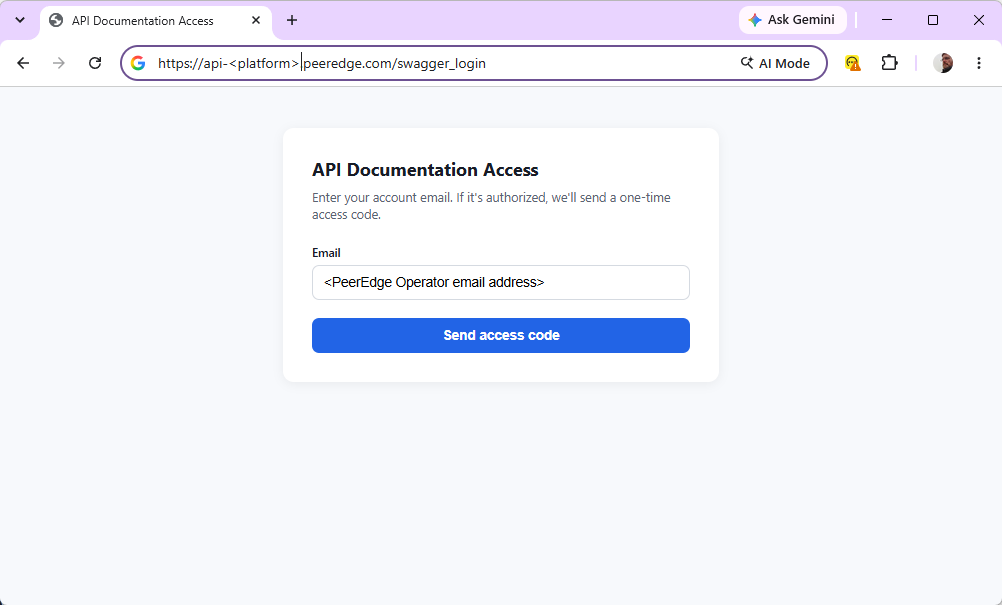
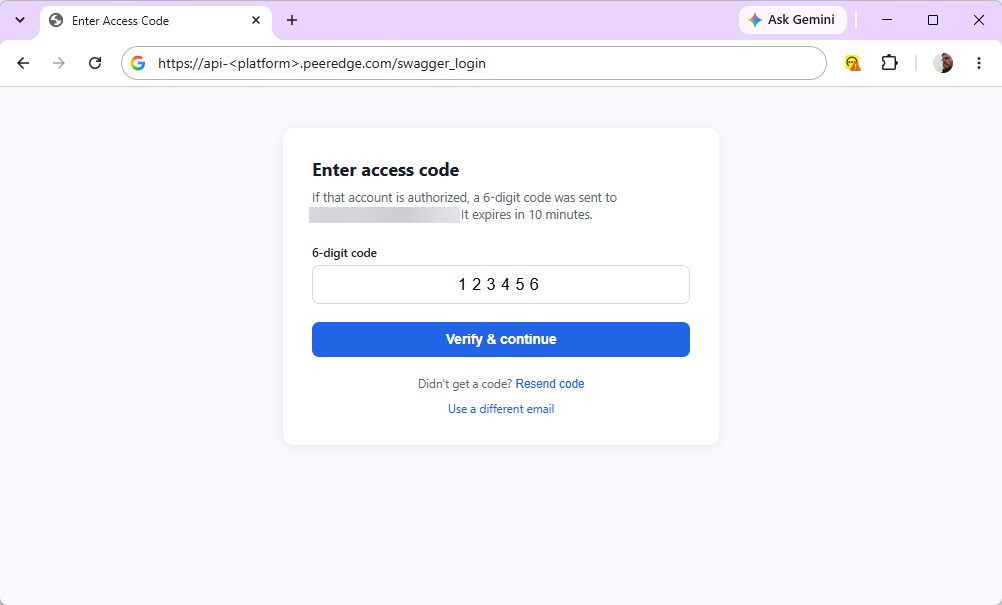
Description: The interactive API documentation and the raw API specification endpoints now require a one-time passcode. Requesting the documentation sends a six-digit passcode by email. The passcode is valid for 10 minutes and allows five attempts before it is discarded and a new one must be requested. Once it is accepted, access lasts 8 hours, after which a fresh passcode is required. The protection is applied in front of every documentation path, so both the interactive pages and the specification documents behind them are covered.
Operator impact: The API documentation surface, which previously required no sign-in, is now reachable only by someone who already holds a portal user account on that installation and can receive its passcode email. A request for an unrecognized address returns the same screen as a recognized one, so the login page cannot be used to discover which addresses exist. Each successful access is recorded in the audit trail alongside sign-in history.
Action required: Operators who use the API documentation should expect a passcode prompt, must be able to receive the passcode email at the address registered on their portal account, and will be prompted again after 8 hours.
Service provider ID in the STIR/SHAKEN attestation report
Category: Enhancement
PeerEdge area: Reporting — STIR/SHAKEN
UI Path: Reports → Attestation
Description: The STIR/SHAKEN attestation report now breaks results out by service provider ID (SPID) and adds a further drill-down level beneath the existing ones.
Operator impact: Attestation volumes and outcomes can be attributed to a specific service provider ID rather than only to the trunk group.
Action required: No operator action is required.
Service provider ID taken from the signing certificate
Category: Enhancement
PeerEdge area: STIR/SHAKEN call handling
UI Path: Not applicable — the identifier is resolved while the call is signed, with no portal screen. Its effect is visible in Reports → Attestation.
Description: When a service provider ID (SPID) is not retrievable from the common name in the subject field in the signing certificate, PeerEdge can now also derive it from the telephone number authorization list carried in the signing certificate.
Operator impact: More signed calls carry a resolved service provider ID, which improves attribution in STIR/SHAKEN reporting and in per-provider filtering.
Action required: No operator action is required.
Connection fee in the international and LATA/OCN destination reports
Category: Enhancement
PeerEdge area: Reporting — destination performance
UI Path: Reports → International Destination; Reports → LATA OCN
Description: The International Destination Performance report and the LATA/OCN destination performance report now include connection fee alongside the existing cost and revenue figures, at every drill level and in the daily rollups.
Operator impact: Per-destination margin figures now account for connection fees without a separate reconciliation.
Action required: No operator action is required.
IP lookup on relationship media report rows
Category: Enhancement
PeerEdge area: Reporting — relationship media
UI Path: Reports → Relationship Performance → Termination Media; Reports → Relationship Performance → Origination Media; Reports → Relationship Percentage → Termination Media; Reports → Relationship Percentage → Origination Media
Description: Rows in the relationship media report now support an IP lookup, in line with the other reports that already offer it.
Operator impact: The address associated with a media record can be resolved without leaving the report.
Action required: No operator action is required.
Automatic retry of card payment processing fees
Category: Enhancement
PeerEdge area: Billing — card payments
UI Path: Relationship portal → Accounting → Send payment → the card payment provider's tab (the processing fee column); the integration is configured from the Settings menu.
Description: When the processing fee for a card payment cannot be retrieved at the moment the payment completes, PeerEdge now retries the retrieval in the background and fills the fee in on the payment record afterwards.
Operator impact: Fewer card payment records are left with a missing processing fee, so payment totals reconcile without manual correction.
Action required: No operator action is required.
Nightly cleanup for the pending international rate data
Category: Enhancement
PeerEdge area: Reporting — pending rate analysis
UI Path: Reports → Pending rate analysis
Description: The minute-level data behind the pending international rate report is now cleaned up on its own nightly schedule rather than being left to accumulate.
Operator impact: Storage growth attributable to the pending rate report is bounded; the report itself is unchanged.
Action required: No operator action is required.
Bug Fixes
Scheduled reports did not run on some installations
Category: Bug Fix
PeerEdge area: Reporting — scheduled reports
UI Path: Not applicable — these reports are produced on a schedule and delivered by email; no portal screen generates them.
Description: Seven scheduled report jobs identified the account they belonged to from a value that is not reliably present on every installation. Where it was absent the jobs either exited without producing a report or attempted to read from the wrong data source. The account is now resolved from the installation's own configuration, which is present everywhere.
Operator impact: Scheduled reports that had silently stopped being produced — including the weekly bursting report — are generated again.
Action required: No operator action is required. Operators who noticed missing scheduled reports should confirm that delivery has resumed.
Routing simulation returned a server error when no routing service could be reached
Category: Bug Fix
PeerEdge area: Routing simulation
UI Path: Tools → Origination simulator; Relationships → Overviews → Routing → [route plan row] → Route Simulator; Relationships → Global → Routing → [route plan row] → Route Simulator; Relationships → All Relationships → [relationship] → Routing → Termination or Origination → [route plan row] → Route Simulator
Description: A routing simulation runs on a Traffic Manager (TM) at the site recorded on the ingress trunk group's trunk. Retries stay within that site: if every TM there fails, the simulation is not handed to a TM at another site, so the result always reflects the site where the call would actually arrive. Previously, when no TM was registered at that site, or when every TM at the site had been tried and failed, the simulation returned a generic server error. It now returns a "temporarily unavailable" response with an explanatory message.
Operator impact: A simulation that cannot run now reports why, instead of presenting as an unexplained fault. A trunk group whose trunks carry no Orchestrator Location is reported separately, with its own message. Note that simulation availability for a trunk group is bounded by the TMs at its one site — where a site has a single TM, that TM being unavailable makes simulation unavailable for every trunk group recorded there, even while other sites are healthy.
Action required: No operator action is required. If a simulation reports that no location is recorded, set Orchestrator Location on the trunk group's trunks (Relationships → trunk group → Trunks). This applies equally to IP, FQDN, and registration trunks.
Sample file downloads failed on the upload screens
Category: Bug Fix
PeerEdge area: Portal — bulk uploads
UI Path: The "Download sample" link inside each bulk-upload dialog: Relationships → Manipulations → Upload; Relationships → All Relationships → [relationship] → Routing → Origination → Numbering → Upload; Relationships → All Relationships → [relationship] → Routing → Origination → Number Forwarding → Upload; Relationships → All Relationships → [relationship] → E911 → Upload; Relationships → All Relationships → [relationship] → Trunk groups → [trunk group] → Block List → Upload; Tools → Master code list → MCL templates → Countries → Upload; Tools → Rate Compare → Upload; Settings → Lists → [list] → Add content
Description: The "Download sample" links on the six bulk upload screens were rejected before the file was served. The sample files are now served correctly, and the missing sample file for manipulation uploads has been supplied with the columns the upload actually reads.
Operator impact: Operators preparing a bulk upload can download a working template again.
Action required: No operator action is required.
Portal IP restriction could not be switched off
Category: Bug Fix
PeerEdge area: Portal — access control
UI Path: Not applicable — address restriction is configured outside the portal. Its only visible effect is whether the portal loads at all.
Description: Portal access could be restricted to a list of permitted addresses. Removing that configuration did not lift the restriction: the installation fell back to a built-in list that still named it as restricted, and with no permitted addresses configured it reverted to placeholder addresses, locking every user out. Address restriction is now applied only where it has been explicitly configured.
Operator impact: Removing the address restriction from an installation now takes effect. Installations that are meant to be restricted are unaffected and keep their configured permitted addresses.
Action required: No operator action is required. Installations that rely on address restriction should confirm that their permitted address list is configured.
Sign-in error screen retried indefinitely
Category: Bug Fix
PeerEdge area: Portal — sign-in
UI Path: Not applicable — the sign-in screen, reached before the portal navigation is available.
Description: A sign-in error was displayed as a short-lived notice and then cleared automatically, which re-triggered the sign-in redirect and produced an endless loop. The error is now shown on its own screen with a "Back to Login" action the operator chooses to take.
Operator impact: A failed sign-in reports its reason and stops, instead of cycling.
Action required: No operator action is required.
CDR uploader log could fill the disk
Category: Bug Fix
PeerEdge area: CDR collection
UI Path: Not applicable — node-side logging, with no portal screen.
Description: The CDR uploader wrote its file-scanning loop to a log that was never rotated, so on a migrated signaling node the file could reach roughly 10 GB within about two hours and exhaust the filesystem. The log is now rotated daily with seven compressed archives retained, and the uploader is signaled to reopen the file after each rotation.
Operator impact: Signaling nodes no longer risk running out of disk from uploader logging. CDR upload itself was never affected.
Action required: No operator action is required.
Long-running rating batches could fail on an idle connection
Category: Bug Fix
PeerEdge area: CDR rating
UI Path: Not applicable — back-end CDR rating, with no portal screen.
Description: Rating a batch can run long enough for an intervening network device to discard an otherwise healthy idle connection used by the rating process, so the write that followed the long silent period failed. Rating now opens a fresh connection and finalizes the batch as part of the statement itself, with no separate confirmation step after the silence.
Operator impact: Large or slow rating batches complete instead of failing and needing to be repeated.
Action required: No operator action is required.
Provisioning sync aborted on unexpected data
Category: Bug Fix
PeerEdge area: Provisioning — switch synchronization
UI Path: Not applicable — synchronization runs on the back end, with no portal screen. The records that caused it are edited at Relationships → All Relationships → [relationship] → Trunk groups and Relationships → Groups → Capacity.
Description: Two conditions stopped a provisioning synchronization run: a subscriber whose configured address, protocol, location and zone did not match any known signaling socket, and a capacity group with no data attached. The first is now logged and that subscriber skipped; the second is treated as no capacity group.
Operator impact: One malformed record no longer prevents every other configuration change in the same run from reaching the switch. The skipped subscriber is named in the log.
Action required: Operators should review the log for skipped subscribers and correct the underlying address, protocol, location or zone.
Invalid STIR/SHAKEN service provider filter entries broke synchronization
Category: Bug Fix
PeerEdge area: STIR/SHAKEN — service provider filters
UI Path: Relationships → All Relationships → [relationship] → Trunk groups → [trunk group] → Stir/Shaken → Add SPID Filter; Tools → Global SPID Blocking
Description: A service provider filter entry is configured with a SIP response code and reason to return. Entries whose response code was not a valid final SIP failure code were carried through to the switch unchecked, and reason text could carry embedded control characters. Invalid codes are now skipped with a warning that names the trunk group and provider ID, and control characters are removed from the reason text.
Operator impact: A mistyped response code on one filter entry no longer disrupts the rest of the configuration, and the reason phrase sent to the far end is well-formed.
Action required: Operators should check the warning log for skipped filter entries and correct the response code, which must be a final failure code in the 400–699 range.
Blocked routes were not enforced on fallback vendors
Category: Bug Fix
PeerEdge area: Routing — termination
UI Path: Relationships → All Relationships → [relationship] → Trunk groups → [trunk group] → Block List
Description: Block rules for a customer and vendor trunk group pair — by calling number, dialed number, LRN, or all prefixes for a vendor — were evaluated only for the main vendor list. Fallback vendor trunk groups were not checked, so a blocked pair could still be selected from the fallback list. Fallback vendors are now checked against the same block rules, for both domestic and international termination.
Operator impact: A configured block now applies wherever the vendor can be selected. Traffic that was previously completing through a fallback route despite a block will now be blocked as configured.
Action required: Operators who use fallback vendor lists should review their block rules, since blocks that were previously ineffective on fallback routes now take effect.
Rate decks with no connection fee value returned no route
Category: Bug Fix
PeerEdge area: Routing — rate decks
UI Path: Relationships → All Relationships → [relationship] → Rating; Relationships → Overviews → Rating
Description: Connection fee normally defaults to zero in a rate deck. Where a deck was loaded with the connection fee explicitly unset, the routing functions returned no result at all rather than routing the call.
Operator impact: Decks loaded with an unset connection fee route correctly.
Action required: No operator action is required.
Call-ID prefix could collide with a call identifier
Category: Bug Fix
PeerEdge area: Call handling — topology hiding
UI Path: Not applicable — no portal screen configures this. The Call-ID itself is visible in Tools → Live trace and in Reports → CDR diagnostic.
Description: Topology hiding prefixes the Call-ID with an account identifier. The prefix and the generated identifier could run together in a way that allowed two different calls to produce the same Call-ID. A separator now makes a collision impossible.
Operator impact: Removes a rare source of two calls sharing a Call-ID, which affects call correlation in tracing and in CDR review.
Action required: No operator action is required.
Delayed call teardown could be retransmitted or lose its CDR
Category: Bug Fix
PeerEdge area: Call handling — call teardown
UI Path: Not applicable — call teardown behavior, with no portal screen.
Description: Where teardown is deliberately delayed, the SIP BYE was answered but the transaction was not retained, so a retransmitted BYE was not matched to the original, and accounting for the call could be emitted at the wrong point. The transaction is now retained until the delay completes and the CDR is emitted at the end of it.
Operator impact: More reliable teardown and more accurate end times on the affected calls.
Action required: No operator action is required.
Undeployed media addresses were offered for call routing
Category: Bug Fix
PeerEdge area: Media handling
UI Path: Not applicable — media resources are defined outside the portal.
Description: Media resources that had been defined but not yet brought into service were still written into the media dispatcher list, so calls could be sent toward an address that was not serving. Undeployed addresses are now excluded.
Operator impact: Removes a source of failed or one-way calls after a media resource is defined but before it is in service.
Action required: No operator action is required.
Live trace dropped packets and altered packet length
Category: Bug Fix
PeerEdge area: Tools — live trace
UI Path: Tools → Live trace
Description: Three problems affected live packet tracing from the portal. Batches of packets arriving together over the trace connection were not all retained, so packets were missing from the displayed trace. Captured SIP packets sent over UDP had their original length altered rather than preserved. And the trace could not be driven by the newer capture engine version.
Operator impact: A live trace shows the packets that were actually seen, at their original length, and continues to work on nodes running the newer capture engine.
Action required: No operator action is required.
August 2026
The August 2026 update includes expanded STIR/SHAKEN policy and CDR data, Inline Documentation, and reliability improvements and more for PeerEdge platform services.
Global STIR/SHAKEN and SPID Filtering
STIR/SHAKEN Background
STIR/SHAKEN Identity headers identify the certificate used to sign a call. A Service Provider Code (SPID) can be derived from supported certificate subject formats and used as part of call-treatment policy.
A SPID is a unique code assigned to a telecommunications service provider. In a STIR/SHAKEN certificate, the SPID will appear as the Service Provider Code (SPC) within the certificate’s Subject field. It identifies the service provider authorized to use the certificate to digitally sign calls. In North America, the identifier is typically an Operating Company Number (OCN) or equivalent provider code. The SPID/SPC identifies the signing provider; it does not identify the individual caller, establish ownership of a particular telephone number, or determine the call’s A, B, or C attestation level.
STIR/SHAKEN Platform Update
PeerEdge now supports global and trunk-group STIR/SHAKEN SPID blocklists. Global policy and trunk-group policy are synchronized to the Traffic Switches and evaluated during call processing.
This update includes:
- Global SPID blocklist enablement.
- Global and trunk-group SPID filter records.
- Separate inbound and outbound SPID filter treatment.
- Support for four digit SPIDs consisting of three digits followed by a uppercase letter*.
- Support for additional certificate Common Name formats observed in deployed certificates.
- Certificate retrieval from the URL in the Identity header.
- Certificate validation and cached certificate metadata.
- Configurable SIP response codes and reason phrases associated with SPID filter records.
When a call is blocked by a SPID filter, the CDR identifies whether the global, inbound, or outbound filter produced the result.
* Although all modern and new SPIDs are three digits followed by a uppercase letter, Legacy SPIDs can be 4 digits (1234), 3 uppercase letters and 2 digits (ABC12), or 4 uppercase letters + 2 digits (ABCD12). The PeerEdge supports these additional SPID shapes for compatibility.
Global SPID blocking
Global SPID blocking occurs before identifying any egress trunk group.
Configuring Global SPID Blocking
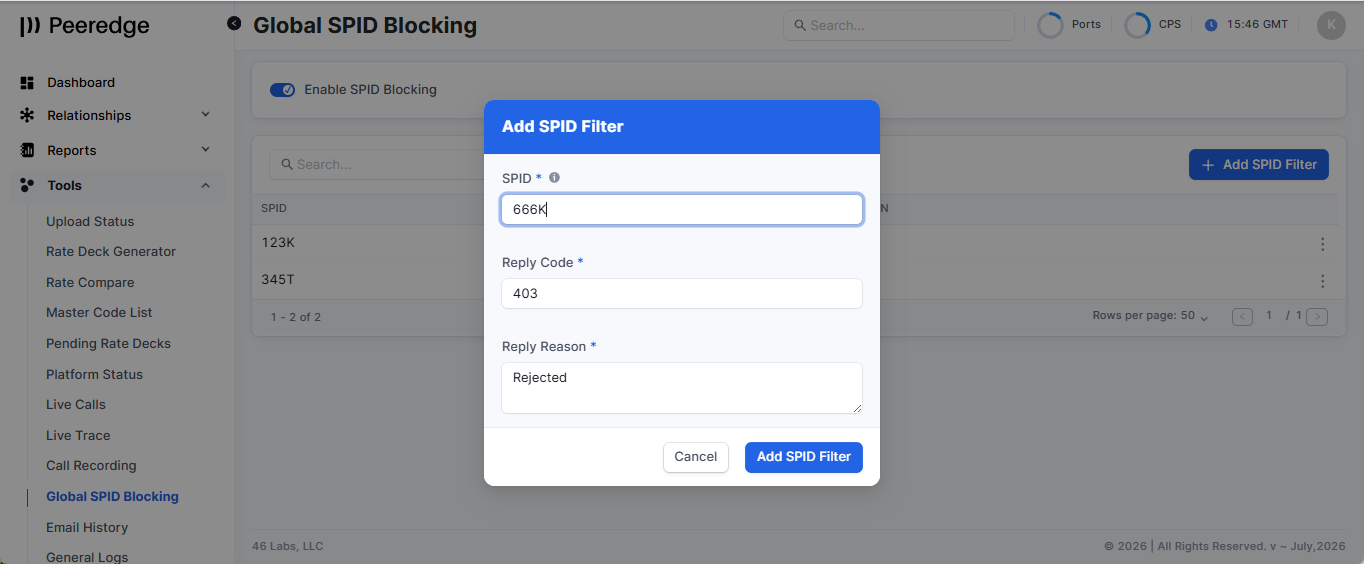
To enable Global SPID Blocking click the enable checkbox in the Global SPID Blocking page accessible from the Tools menu and then click the Enable button in the Enable SPID Block pop-up dialog box.
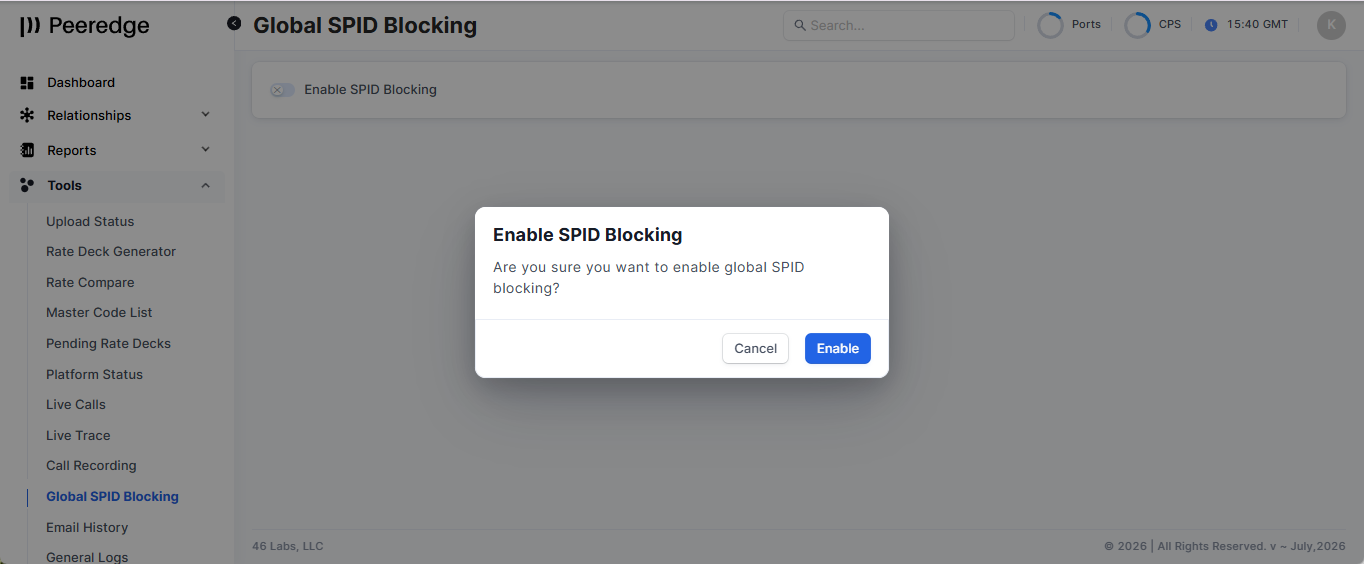
To add a SPID to the Global list, click the + Add to SPID Filter button. Enter the SPID, Reply code and Reply Reason and click the Add SPID Filter button.
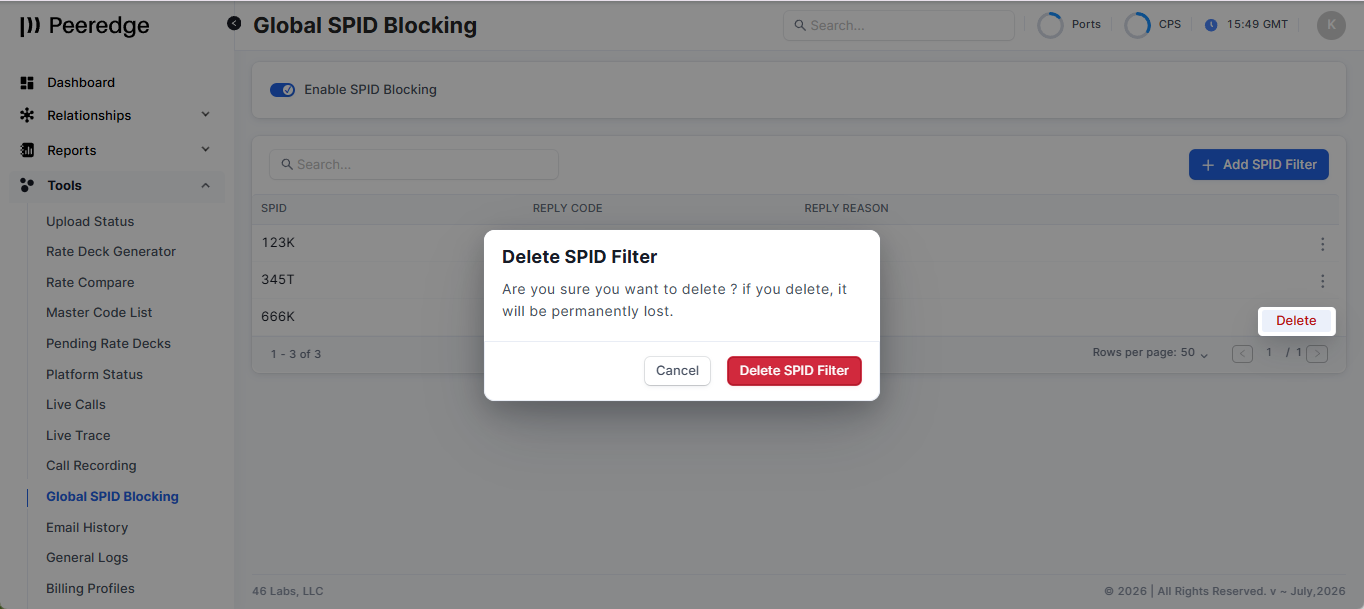
To delete a SPID from the Global SPID Blocking list, click the horizonal ellipsis to the right of the SPID, select Delete and the click the Delete SPID Filter button.
Trunk Group STIR/SHAKEN and SPID Filtering enhancements
Trunk-group-level SPID blocking occurs at different points depending on where it is configured.
Ingress (Termination Customer or Origination Vendor) Trunk Group
The SPID check occurs after PeerEdge determines the available egress routes, but before it begins processing or sending the call to an egress trunk group.
If the SPID matches the ingress trunk group’s blocklist, PeerEdge rejects the call immediately using the configured SIP response code and reason.
Egress (Termination Vendor or Origination Customer) Trunk Group
The SPID check occurs after PeerEdge selects a specific egress trunk group, but before it sends the call to that trunk.
If the SPID matches the egress trunk group’s blocklist, PeerEdge blocks the call using the configured SIP response code and reason.
In summary:
Ingress SPID blocking: After route selection, before egress processing.
Egress SPID blocking: After selecting an egress trunk group, before sending the call to it.
SPID blocking impact on CDRs
When SPID blocking occurs, the failed-call CDR records both the blocking location and the STIR/SHAKEN identity details.
Blocking result fields
stir_status
Global block: GL_SPID_FILTER
Ingress trunk-group block: IN_SPID_FILTER
Egress trunk-group block: OUT_SPID_FILTER
release_cause_internal: SS_SPID_FILTER
sip_code: The SIP response code configured on the matching SPID filter.
sip_reason: The SIP reason configured on the matching SPID filter.
Identity and certificate fields
These are populated from the received Identity header and its signing certificate when available:
stir_spid: The SPID that matched the blocklist.
stir_cert_cn: Signing certificate Common Name.
stir_cert_org: Signing certificate organization, if present.
stir_x5u: Signing certificate URL.
stir_attest: Attestation level.
stir_orig_id: PASSporT origination identifier.
stir_orig_tn: Originating telephone number from the PASSporT.
stir_dest_tn: Destination telephone number from the PASSporT.
stir_iat: PASSporT issued-at timestamp.
Trunk-group identification
For a global or ingress trunk-group block, orig_trunk_group_id is populated, but term_trunk_group_id is normally empty because PeerEdge has not begun processing an egress trunk-group candidate.
For an egress trunk-group block, both orig_trunk_group_id and term_trunk_group_id are populated. The terminating ID identifies the egress trunk group whose SPID policy blocked the call.
Certificate fields can be empty when the corresponding value is unavailable, but stir_spid must be present for an SPID filter match to occur.
Configuring Trunk Group level SPID Blocking
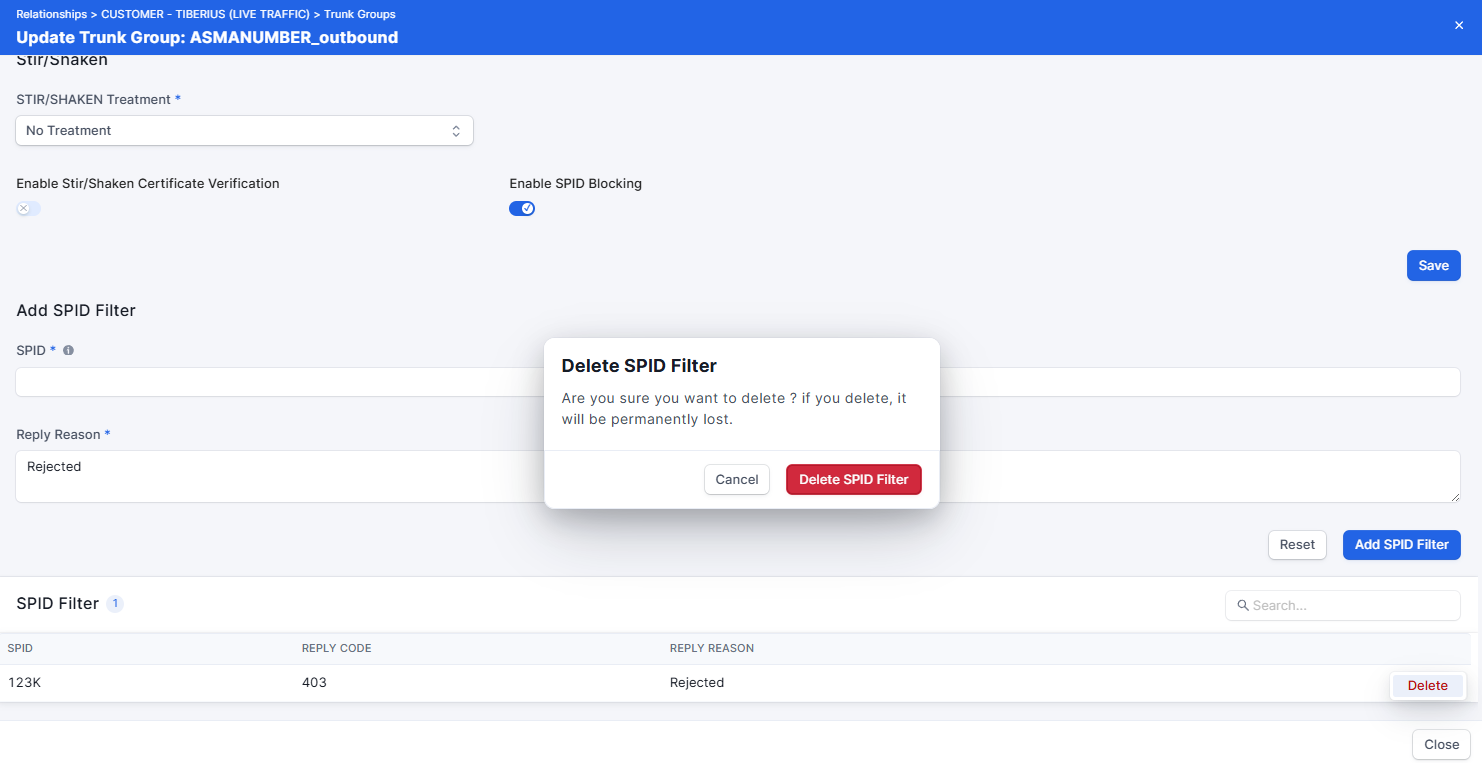
To enable SPID Blocking for a Trunk Group, go to the Trunk Group's Stir/Shaken tab, click on the Enable SPID Blocking and click the Save button.
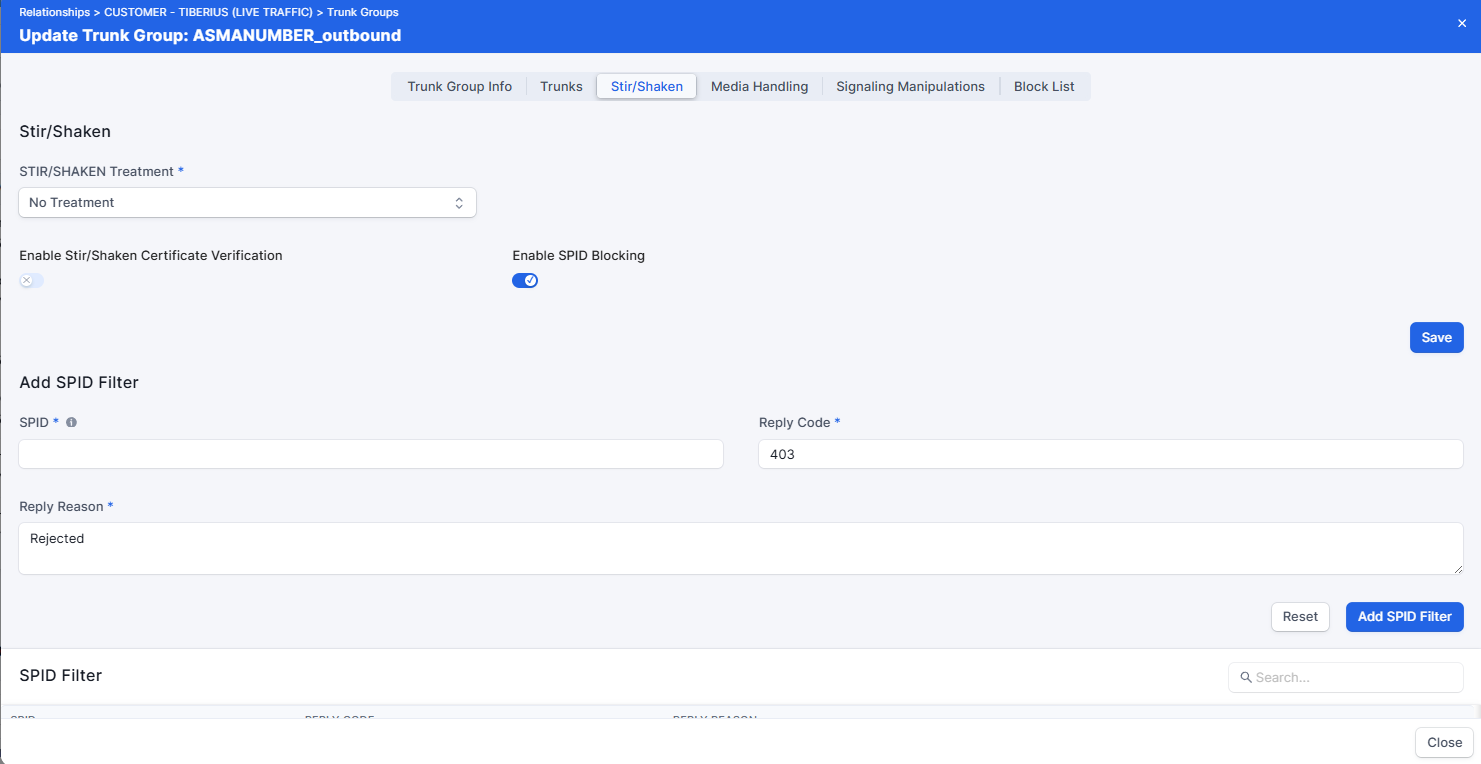
Previously to enable SPID Blocking Stir/Shaken Certificate Verification also had to be enabled this is no longer a requirement for SPID Blocking.
To add a SPID to the SPID Filter list, enter the SPID, Reply Code and Reply Reason and click the Add SPID Filter button.
Previously a Subject Filter Regex used instead a a SPID. During the update all configured regex filters will be converted to SPIDs (assuming the SPID shape was included in the regex).
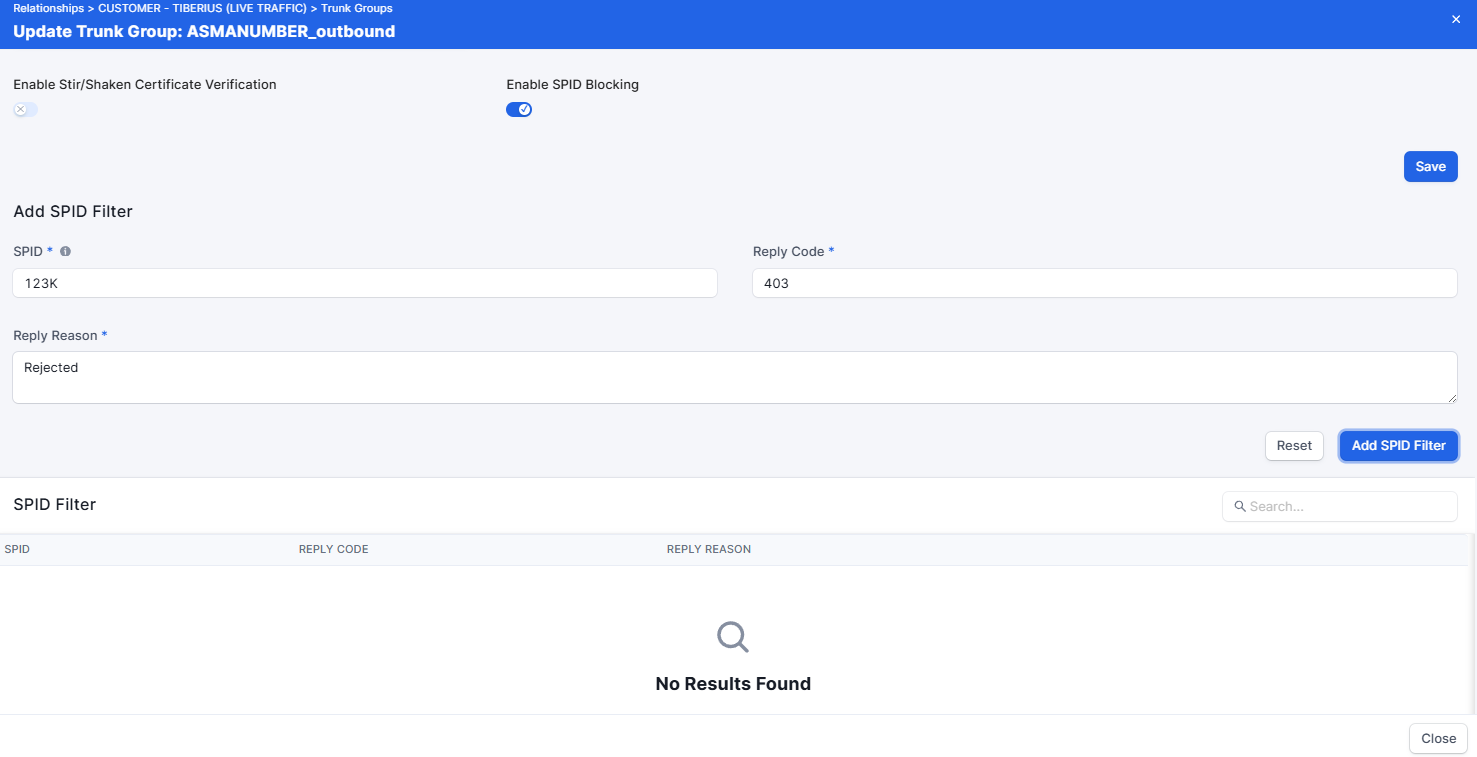
To delete a SPID from the SPID Filter list, click the horizonal ellipsis to the right of the SPID, select Delete and the click the Delete SPID Filter button.
Expanded STIR/SHAKEN and CDR Information
STIR/SHAKEN CDR Information
PeerEdge CDRs now include additional information about STIR/SHAKEN processing:
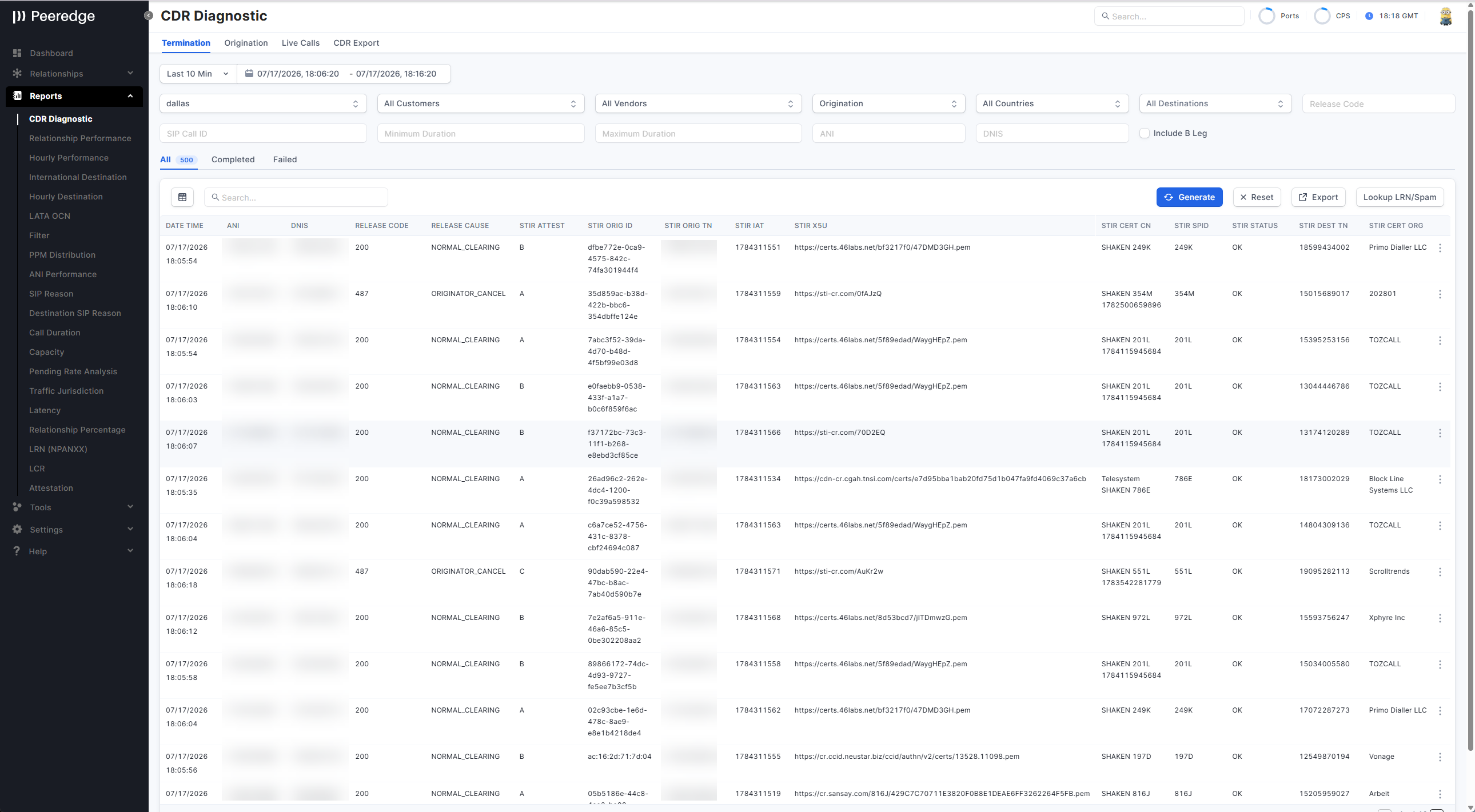
stir_cert_cn— certificate Common Name.stir_cert_org— certificate organization.stir_spid— Service Provider Code derived from the certificate.stir_status— the result of signing, verification, certificate validation, attestation policy, or SPID filtering.stir_x5u— the certificate URL supplied in the Identity header.
Calls signed by the local PeerEdge platform are attributed with the Common Name, organization, and SPID from the configured signing certificate. The SIGNED_OK status distinguishes calls signed locally from calls that completed other STIR/SHAKEN processing successfully.
The CDR Diagnostics export includes the STIR/SHAKEN certificate organization for environments where the STIR/SHAKEN export columns are enabled.
Database Synchronization Update
PeerEdge database synchronization tasks now run as four independent schedules:
- Main platform and trunk configuration — every minute.
- Routing rules and miscellaneous data — every minute.
- ANI, DNIS, prefix, LRN, and related lists — every 15 minutes.
- Hourly synchronization tasks — at the top of each hour.
Separating these schedules prevents a problem in one synchronization role from stopping the other roles from running. Service start limits were also changed so that the scheduler continues attempting synchronization after repeated failures.
This is an operational reliability change; it does not add a new PeerEdge Orchestrator configuration screen.
Vendor Routing Overview
Category: New Feature
PeerEdge area: Relationships — vendor trunk groups and routing
UI Path: Relationships → Overviews → Vendor Routing
Description: A new Vendor Routing Overview gives a reverse view of termination routing for a selected vendor trunk group: every terminating route plan that can send traffic to it — whether through a routing rule or through the domestic or international default vendor list — the customer trunk groups attached to each of those plans, the rate sheets assigned to the vendor by termination and origination category, and summary metrics. Results are sortable and paged, and the same view is available through the API.
Operator impact: Answering "which customers and route plans can actually reach this vendor?" no longer requires opening each route plan in turn and reading its rule list and default vendor lists individually.
Action required: No operator action is required.
General Improvements and Bug Fixes for August 2026
- Connection fee has been added to the following reports:
- Destination Performance Report
- Hourly Destination Performance Report
- LATA OCN Report
- Relationship Percentage Report
- Auth0 carrier selection fix — Relationship portal authentication now selects the first available carrier when a carrier identifier has not yet been supplied, preventing the initial portal request from failing for users associated with multiple carriers.
- API Tokens visibility fixes — The agent route and relationship settings tab now follow the account-level API Tokens setting. Relationship portal token status labels were also corrected.
- STIR/SHAKEN signed-call status fix — Calls signed by the local PeerEdge platform now retain the
SIGNED_OKCDR status instead of being reported with the genericOKstatus. - STIR/SHAKEN certificate parsing improvements — Certificate processing now recognizes additional real-world Common Name formats when deriving the SPID.
- STIR/SHAKEN signed-call attribution — Locally signed calls now include the signing certificate Common Name, organization, and SPID in CDR data.
- CDR upload compatibility fix — CDR upload accepts records with more fields than the configured database mapping requires.
- Failed CDR formatting fix — Failed flat-file CDR records no longer receive an extra empty trailing field.
- Unrated CDR alert fix — CDR pruning no longer rolls back the monitoring alert created when unrated calls prevent pruning.
- Database synchronization recovery — Synchronization timers continue firing after repeated failures, and separate task schedules reduce the effect of an individual synchronization failure.
- PeerEdge configuration lookup fix — The API reads the first valid PeerEdge IP-location configuration file instead of combining duplicate files exposed through legacy compatibility links.
- Routing simulation response fix — Routing simulation accepts the successful HTTP response text without depending on capitalization.
- Portal security logging improvement — Portal web-server access logging no longer includes request credentials.
- Portal rendering and configuration fixes — Shared styling, production environment injection, and development route-location handling were corrected following the portal consolidation.
- Monitoring installation fixes — Zabbix agent installation and old configuration cleanup were corrected for PeerEdge package deployment.
March 2026
603+ Call Blocking Feature
Background
The Federal Communications Commission's Eighth Report and Order (FCC 25-15) adopted SIP 603+ requirements to fulfill the TRACED Act’s mandate for “transparency and effective redress” for callers whose calls are blocked based on reasonable analytics. The FCC established SIP 603+ as the exclusive, uniform response code for analytics-based blocking on IP networks, ensuring callers receive immediate and standardized notification that a call was “Network Blocked.”
This requirement is intended to help callers quickly understand when a call was blocked and why, and to provide sufficient information to identify and correct erroneous blocking. The FCC notes that SIP 603+ differs from standard SIP 603 by using the reason phrase “Network Blocked” and by requiring standardized Reason header fields that indicate analytics-based blocking and provide contact information for redress.
Exemptions / Scope Notes
Do-Not-Originate (DNO) list blocking is not subject to the SIP 603+ notification requirement (the 603+ requirement is specifically tied to analytics-based blocking).
Blocking performed at the request of a customer without the use of analytics is also treated differently; SIP code 607 may be used for its intended purpose (subscriber-directed blocking without analytics), and the FCC declines to mandate 607 because immediate notification is required only for analytics-based blocking.
Note: “DNC” lists are not explicitly named in FCC 25-15; if your “DNC Conversion” behavior is customer-requested and non-analytics, it may fall into the “without analytics” category described above.
SIP 603+ Implementation Requirements (Analytics-Based Blocking)
Status line (Reason Phrase): SIP 603+ must use the reason phrase “Network Blocked” (rather than “Decline”).
Reason header: The Reason header must include standardized/mandatory text fields indicating the block was based on analytics and providing contact information for redress.
Prohibited Codes for Analytics-Based Blocking
Voice service providers must stop using the standard version of SIP 603, as well as SIP 607 and SIP 608, for analytics-based blocking once 603+ by 25 March 2026.
Transmission and Mapping Obligations
Transparent forwarding: Any IP provider receiving a SIP 603+ response must transmit the full header, including all mandatory text fields, back toward the origination point.
Network interoperability: Providers must ensure SIP 603+ maps appropriately to ISUP code 21 when calls traverse between IP and TDM networks.
PeerEdge Platform Update
The March update includes the software and configuration changes required to implement the FCC’s SIP 603+ requirements for analytics-based call blocking. Relevant PeerEdge failure responses have been updated to 603 with the SIP reason phrase “Network Blocked.” (This aligns with the FCC’s description of SIP 603+ using “Network Blocked” in the SIP Reason Phrase.)
46 Labs will roll this out to all customers during individual maintenance windows in Mid-March 2026. Specific maintenance notifications will be sent to each service provider prior to the upgrade.
Expected Impact:
During the scheduled maintenance window, the rebooting of the Traffic Switches (TS) which typically takes a couple minutes. The TS reboot process forcibly terminates all calls, which allows the PeerEdge to generate the CDRs. For communication service providers with multiple locations, it is standard practice to do one location at a time. We generally recommend 2:00 – 4:00 am local time for the maintenance window.
Service Provider Actions Required
1. Review and update spam blocking rules (if needed) in all termination and origination route plans.
If you would like a current list of spam blocking rules configured in your PeerEdge route plans, please email kelly.evans@46labs.com with the subject line: “spam blocking rules request”. Note: For security reasons, the list will be provided only to a user with administrator access on the PeerEdge platform.
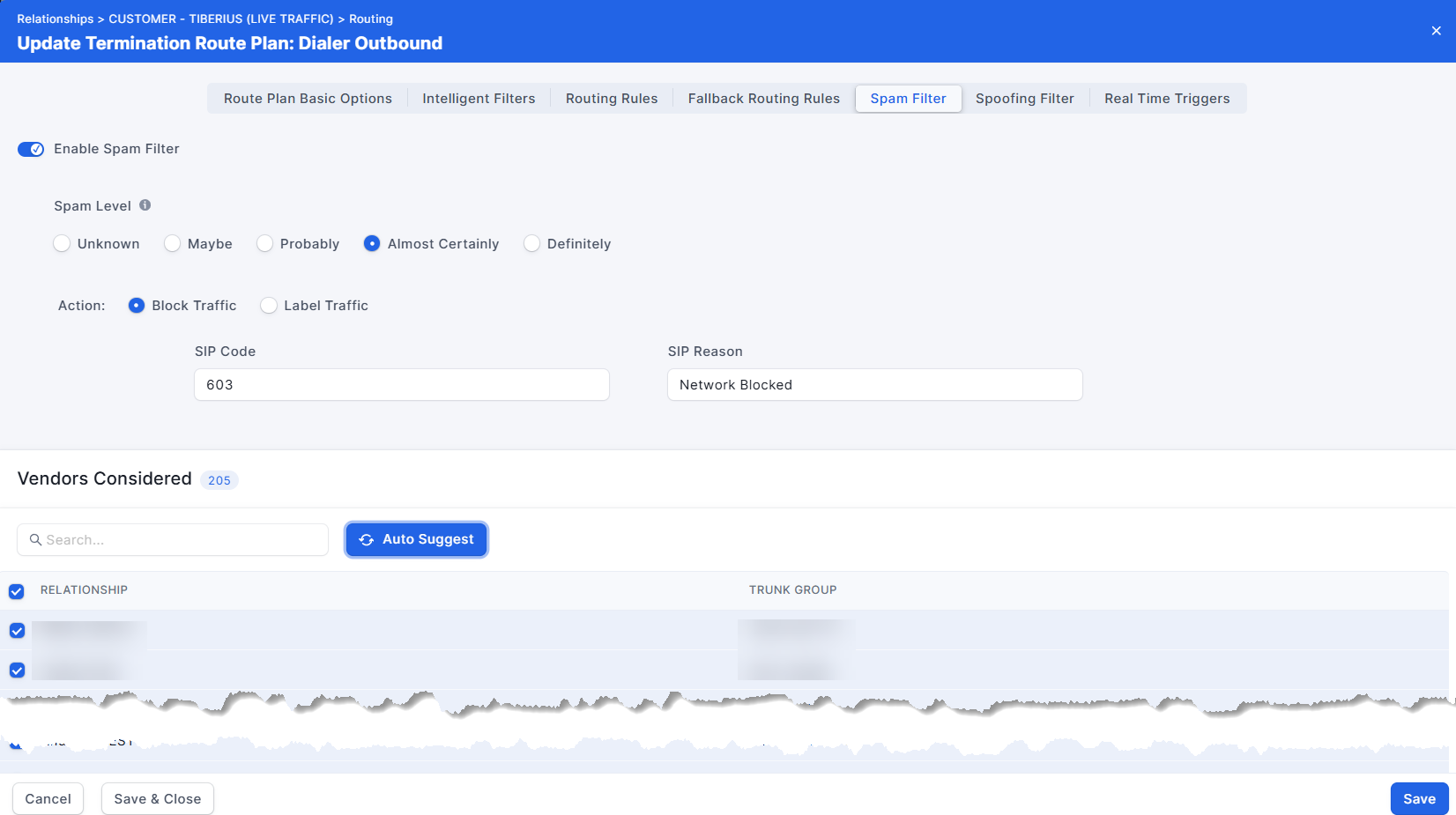
46 Labs recommends consulting with your legal department to determine whether any PeerEdge static or dynamic lists used in your environment are considered analytics-based call blocking under the FCC framework. Note: The SIP Code and SIP Reason Phrase for termination route plan routing rules cannot be changed in the Portal. If you need to change either the SIP Code or the SIP Reason Phrase for existing rules, then the rules will need to be deleted, re-added and re-positioned.
The new default SIP Code and SIP Reason Phrase for a Spam Filter's Block Traffic action is 603 and Network Blocked.
2. Verify and update (if required) the 603+ redress email address.
The 603+ redress email address can be updated from the E-Mail tab in the General Settings page.
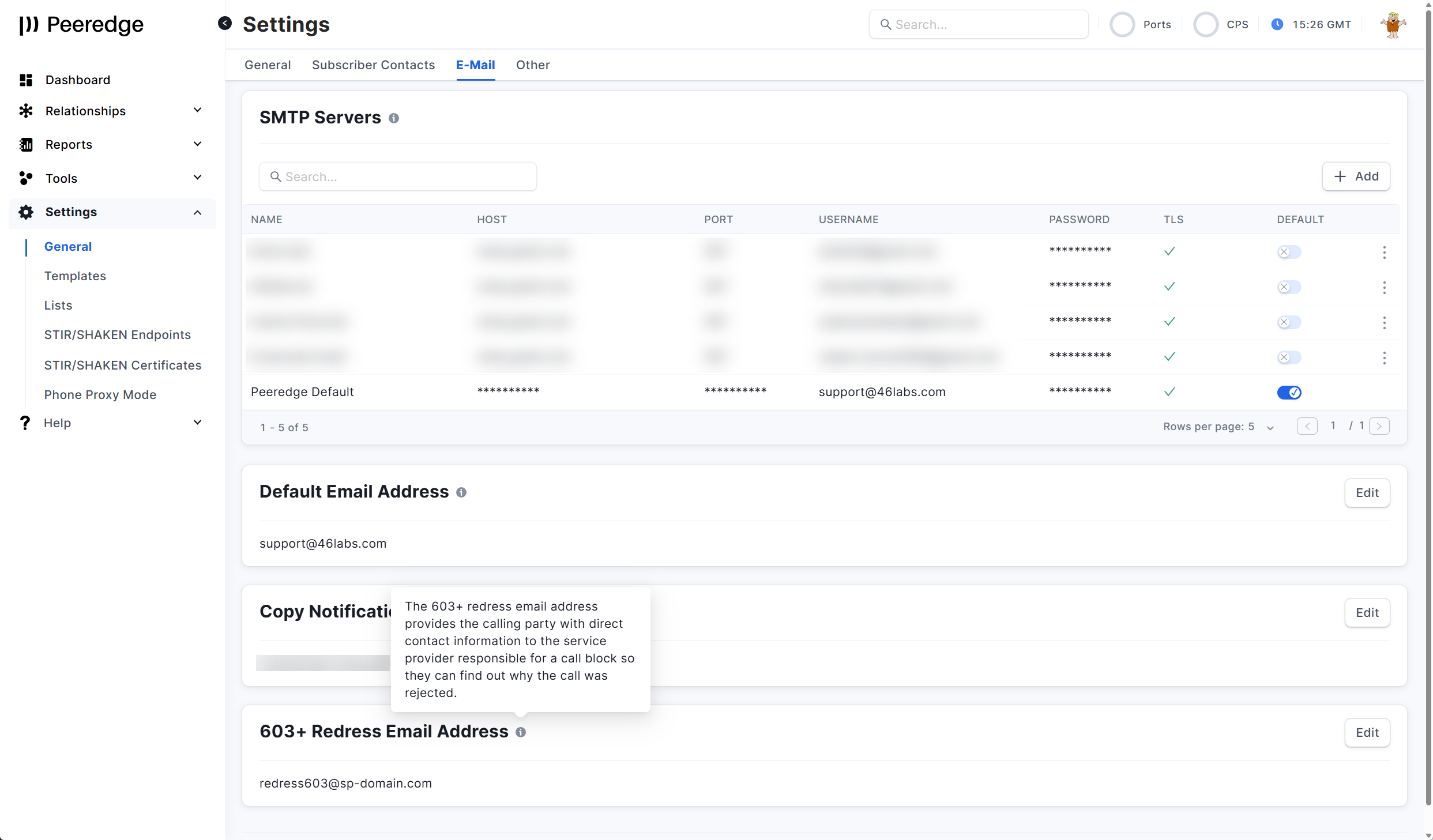
Although The Eighth Report and Order allows for a redress email address, phone number or web site, 46 Labs has only implemented the redress email method. If you need a redress phone number or web site, please submit a feature request.
PeerEdge Orchestrator 603+ FAQs
Call Connection Fee
A Call Connection Fee can be applied each time a call is successfully connected, regardless of call duration. This fee is in addition to per-minute rates. Connection fees apply only to calls from Termination Customer trunk groups.
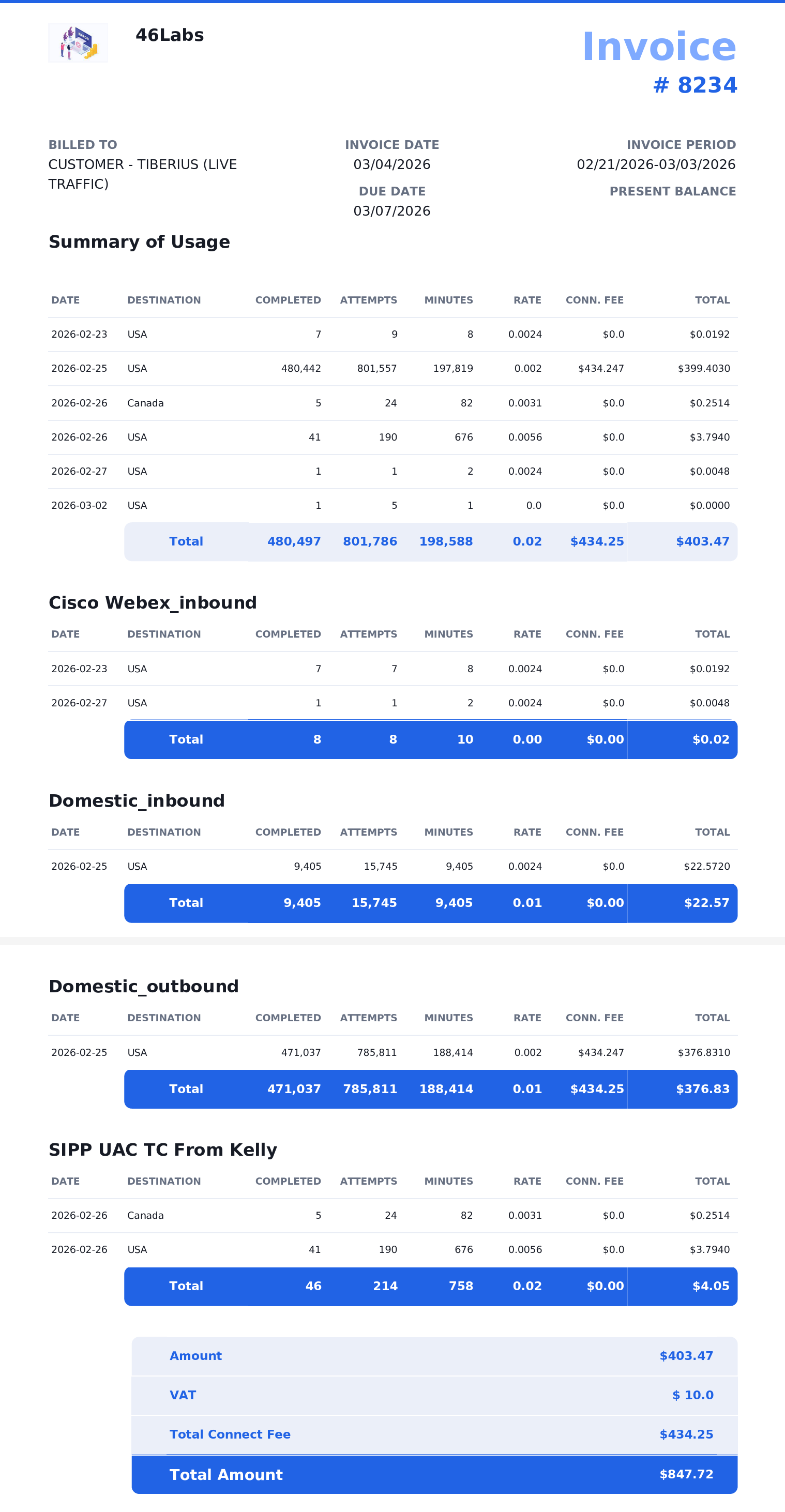
Important: Revenue in reports such as the Relationship Report and Hourly Performance Report includes the Call Connection Fee. It is calculated across all CDRs in the selected time range as: SUM(revenue + COALESCE(fee_connect, 0))
To add connection fees
Add or edit a Termination Customer ratedeck.
Enable Connection Fee (this option is visible only when Direction = Termination and Relationship = Customer).
When enabled, the CONNECTION FEE field appears in the file column-mapping list.Upload a ratedeck file that includes a connection fee for each code (e.g each NPANXX).
In the CONNECTION FEE mapping field, select the CSV column that contains the connection fee values (for example,connection_fee, as shown in the image below).
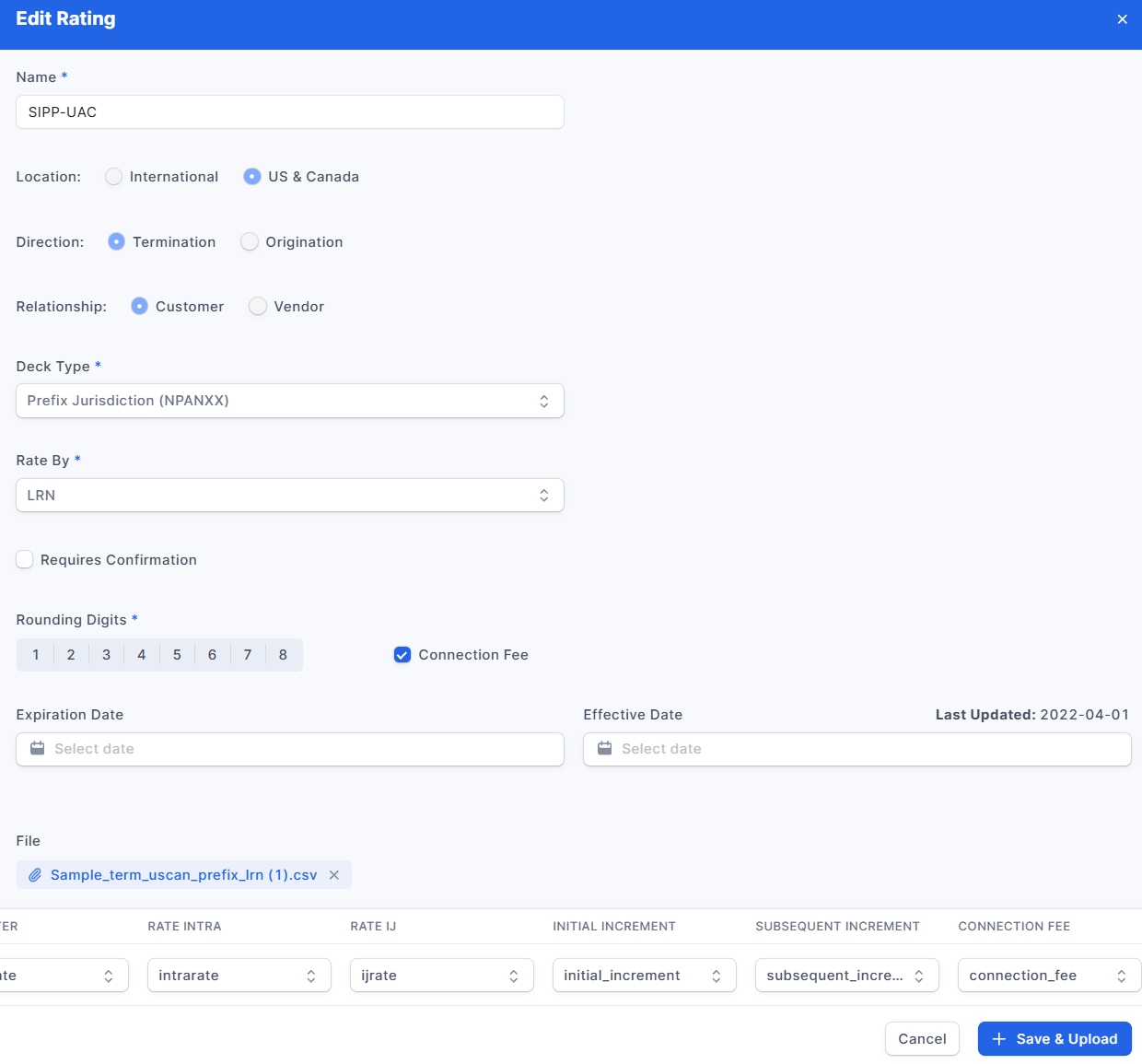
Sample US & Canada Termination Customer Ratedeck
| destination | code | interrate | intrarate | ijrate | initial_increment | subsequent_increment | connection_fee |
| USA | 1201201 | 0.0075 | 0.0075 | 0.0075 | 6 | 6 | 0.0015 |
| USA | 1201202 | 0.000307 | 0.001766 | 0.001766 | 6 | 6 | 0.0015 |
| USA | 1201203 | 0.001939 | 0.001939 | 0.001939 | 6 | 6 | 0.0015 |
| USA | 1201204 | 0.001564 | 0.001143 | 0.001564 | 6 | 6 | 0.0015 |
| USA | 1201205 | 0.00296 | 0.002552 | 0.00296 | 6 | 6 | 0.0015 |
| USA | 1201206 | 0.00296 | 0.002552 | 0.00296 | 6 | 6 | 0.0015 |
| USA | 1201207 | 0.000478 | 0.000358 | 0.000478 | 6 | 6 | 0.0015 |
| USA | 1201208 | 0.001134 | 0.001795 | 0.001795 | 6 | 6 | 0.0015 |
| USA | 1201209 | 0.00046 | 0.00046 | 0.00046 | 6 | 6 | 0.0015 |
| USA | 1201210 | 0.002056 | 0.00134 | 0.002056 | 6 | 6 | 0.0015 |
| USA | 1201212 | 0.00296 | 0.002552 | 0.00296 | 6 | 6 | 0.0015 |
| USA | 1201213 | 0.000478 | 0.000358 | 0.000478 | 6 | 6 | 0.0015 |
| USA | 1201214 | 0.001188 | 0.000945 | 0.001188 | 6 | 6 | 0.0015 |
| USA | 1201215 | 0.001195 | 0.001195 | 0.001195 | 6 | 6 | 0.0015 |
| USA | 1201216 | 0.000606 | 0.0013 | 0.0013 | 6 | 6 | 0.0015 |
| USA | 1201217 | 0.00046 | 0.000631 | 0.000631 | 6 | 6 | 0.0015 |
| USA | 1201219 | 0.000307 | 0.000307 | 0.000307 | 6 | 6 | 0.0015 |
| USA | 1201220 | 0.001233 | 0.00112 | 0.001233 | 6 | 6 | 0.0015 |
Example International Termination Customer Ratedeck
| destination | code | rate_intl | initial_increment | subsequent_increment | effective_date | connection_fee |
| Aeromobile | 883 | 0.0075 | 1 | 1 | 6/15/2021 | 0.0015 |
| Aeromobile | 88299 | 0.000307 | 1 | 1 | 6/15/2021 | 0.0015 |
| Afghanistan (ON-NET) | 9320 | 0.001939 | 1 | 1 | 6/15/2021 | 0.0015 |
| Afghanistan (ON-NET) | 9330 | 0.001514 | 1 | 1 | 6/15/2021 | 0.0015 |
| Afghanistan (ON-NET) | 9340 | 0.00291 | 1 | 1 | 6/15/2021 | 0.0015 |
| Albania | 3555 | 0.00291 | 1 | 1 | 6/15/2021 | 0.0015 |
| Albania | 3558 | 0.000478 | 1 | 1 | 6/15/2021 | 0.0015 |
| Albania | 35521 | 0.001134 | 1 | 1 | 6/15/2021 | 0.0015 |
| Albania | 35522 | 0.00041 | 1 | 1 | 6/15/2021 | 0.0015 |
| Belgium-Mob (OTHERS) | 326977 | 0.002051 | 1 | 1 | 6/15/2021 | 0.0015 |
| Belgium-Mob (OTHERS) | 326978 | 0.00291 | 1 | 1 | 6/15/2021 | 0.0015 |
| Belgium-Mob (OTHERS) | 326984 | 0.000478 | 1 | 1 | 6/15/2021 | 0.0015 |
| Belgium-Mob (OTHERS) | 326985 | 0.001188 | 1 | 1 | 6/15/2021 | 0.0015 |
| Brazil-Mobile | 55968159 | 0.001195 | 1 | 1 | 6/15/2021 | 0.0015 |
| Brazil-Mobile | 55968161 | 0.000101 | 1 | 1 | 6/15/2021 | 0.0015 |
| Brazil-Mobile | 55968162 | 0.00041 | 60 | 60 | 6/15/2021 | 0.0015 |
| Tonga | 676686 | 0.000307 | 60 | 60 | 6/15/2021 | 0.0015 |
| Tonga | 676687 | 0.001233 | 60 | 60 | 6/15/2021 | 0.0015 |
The Call Connection Fee can only be used in rate decks associated with Termination Customer trunk groups and will always have a precision of 8 digits.
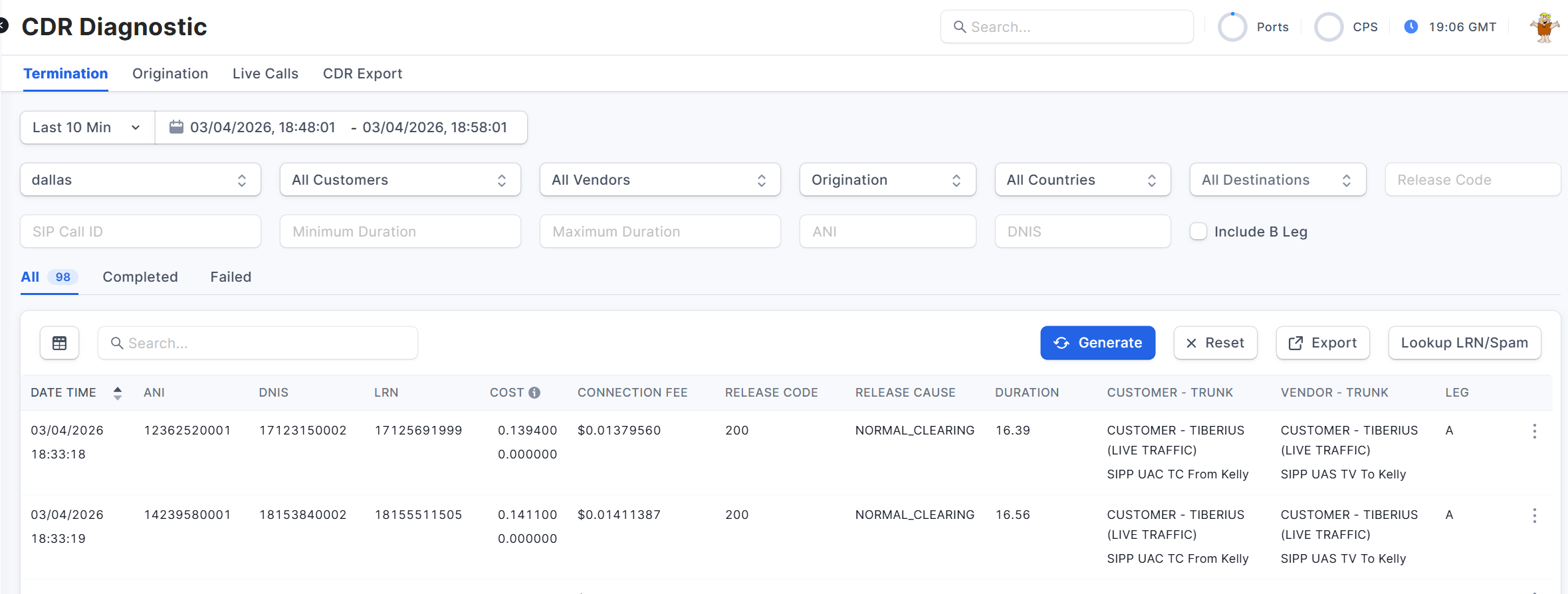
To include Connection Fees in the Invoices, check the Show Connection Fee On Invoice option in the Invoice & Banking section (step 2) of the Invoice Template used to create the Invoice.
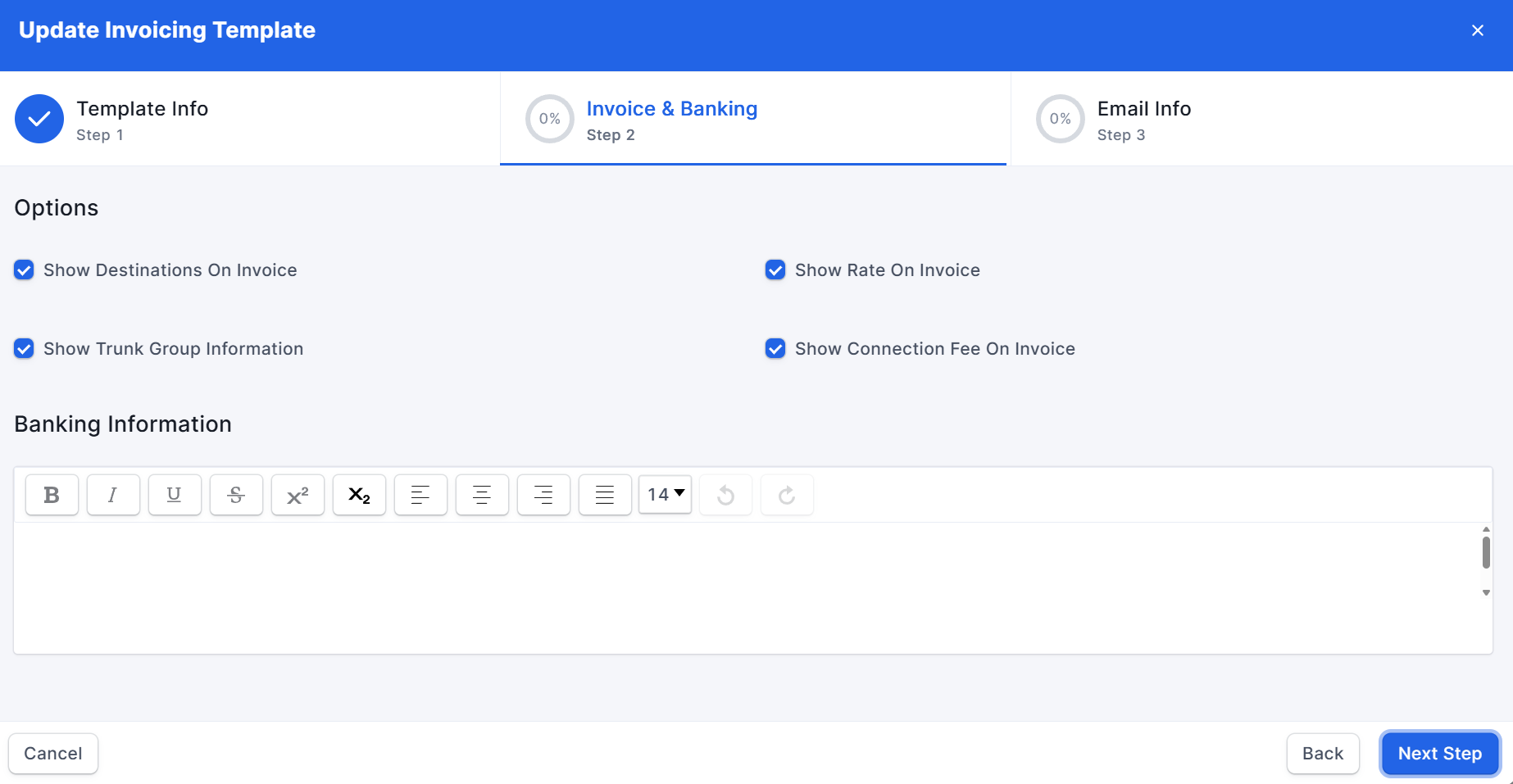
The Call Connection Fee will be shown in the Invoice in the following sections:
Summary of Usage
Each Trunk Group
Total Connection Fee
Vendor Media IP Blocking – Behavior Change
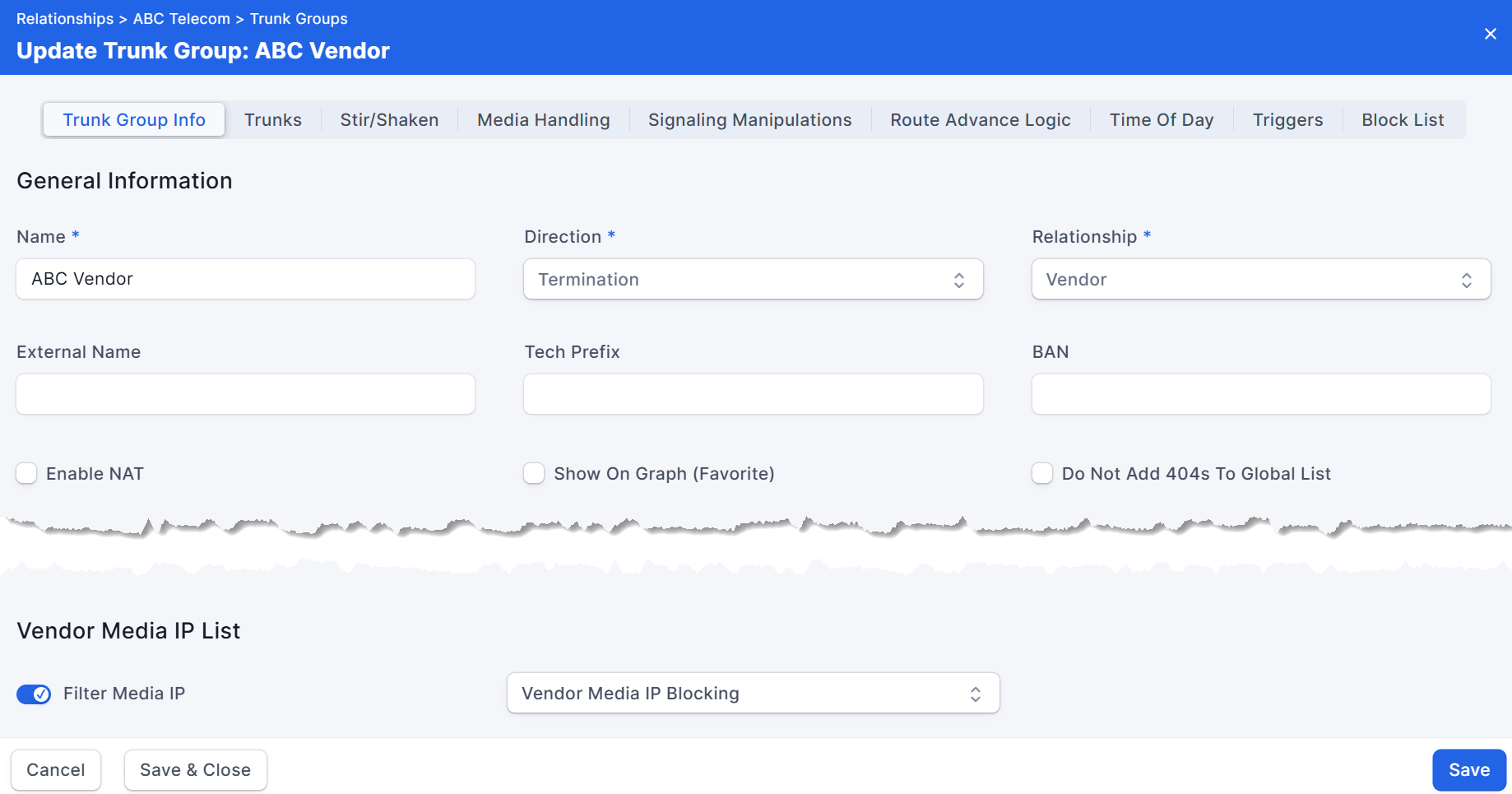
Previously, when the PeerEdge Orchestrator received a 183 Session Progress response with SDP containing a blocked/bad media IP from a termination vendor, it would send a SIP CANCEL toward both the customer and the vendor. In practice, vendors often send a 200 OK immediately after the 183, which can cause a race condition. Per RFC 3261, a 200 OK must be processed even if a CANCEL has already been sent, which could lead to calls being established and subsequent billing disputes.
Now, when Media IP Filtering is enabled on a Termination Vendor Trunk Group, the Orchestrator evaluates the SDP in the 200 OK. If the SDP contains an IP address that matches the trunk group’s Filter Media IP list, the Orchestrator proceeds as follows:
Processes the 200 OK and the customer’s ACK as required by RFC 3261.
Immediately after processing the ACK, it terminates the call by sending a SIP BYE to both the customer and the vendor.
This typically results in a CDR with a 1-second or less call duration. RFC 3261 requires BYE (not CANCEL) to terminate a call after a 200 OK has been received. The CDR will have a sip_code (RELEASE CODE in UI) of 200, a sip_reason of OK, and a reason (RELEASE CAUSE in UI) of MEDIA_IP_BLACKLIST or occasionally BLOCK_NOT_CONFIRMED.
General Improvements and Bug Fixes for February 2026:
Implemented IP-based restrictions - New middleware to restrict API access based on IP addresses.
Added rack blocker for bot attacks – Introduced a Universal Security Middleware with behavioral pattern detection for blocking malicious requests.
Fixed ex_routing_rules fallback issue – Updated fallback handling in routing rules controller.
Fixed request.params issue - Resolved Rack parsing errors by checking UTF-8 text encoding before parsing parameters.
Trunk group model fix - Minor change to TrunkGroup model.
Relaxed security parameters - Increased limits in security middleware to accommodate API needs (higher parameter length, count, special char ratio).
IP Restriction Middleware tweaks - Minor adjustments to IP restriction middleware.
IP Restriction Middleware updates - Small fixes to IP restriction logic.
Added provisioning check - Simplified IP restriction middleware, added provisioning verification.
Was this article helpful?
That’s Great!
Thank you for your feedback
Sorry! We couldn't be helpful
Thank you for your feedback
Feedback sent
We appreciate your effort and will try to fix the article